How to Make Money on Pinterest in 2026: The Complete Skyscraper Monetization Guide
Learning how to make money on Pinterest has transformed from a casual side hobby into one of the most reliable digital income engines on the modern internet. Unlike traditional social media platforms that demand endless daily posting, Pinterest functions as an intent-driven visual search engine where your content compounds in value for months.
Over 631 million monthly active users (Q1 2026) log onto Pinterest not to consume mindless entertainment, but to discover solutions, plan future purchases, and curate life inspiration. This commercial search intent creates unprecedented conversion rates for savvy creators, affiliate marketers, and digital entrepreneurs who understand how the underlying platform mechanics operate.
Whether you own an established blog or start with zero followers and no website, you can build profitable outbound traffic funnels. This comprehensive skyscraper blueprint details every verified monetization model working right now, backed by transparent analytics, technical workflows, and realistic mathematical projections.

⚡ QUICK VERDICT: HOW PINTEREST MONETIZATION ACTUALLY WORKS
- Pinterest does not pay creators directly for pin impressions or video views. Instead, it serves as an immense organic traffic distribution engine.
- You monetize this traffic by channeling motivated users through outbound links to affiliate offers, digital products, e-commerce storefronts, or ad-monetized websites.
- You do not need an existing social following to earn your first commission. Because Pinterest relies on search algorithms rather than follower feeds, fresh accounts can generate immediate outbound clicks.
- Realistic timeline: Most dedicated creators generate initial outbound clicks within 14 to 30 days, achieve consistent sales by day 60, and build reliable compounding income between months 3 and 6.
🌍 GLOBAL GEO AVAILABILITY & REGIONAL POLICY CLARIFICATION
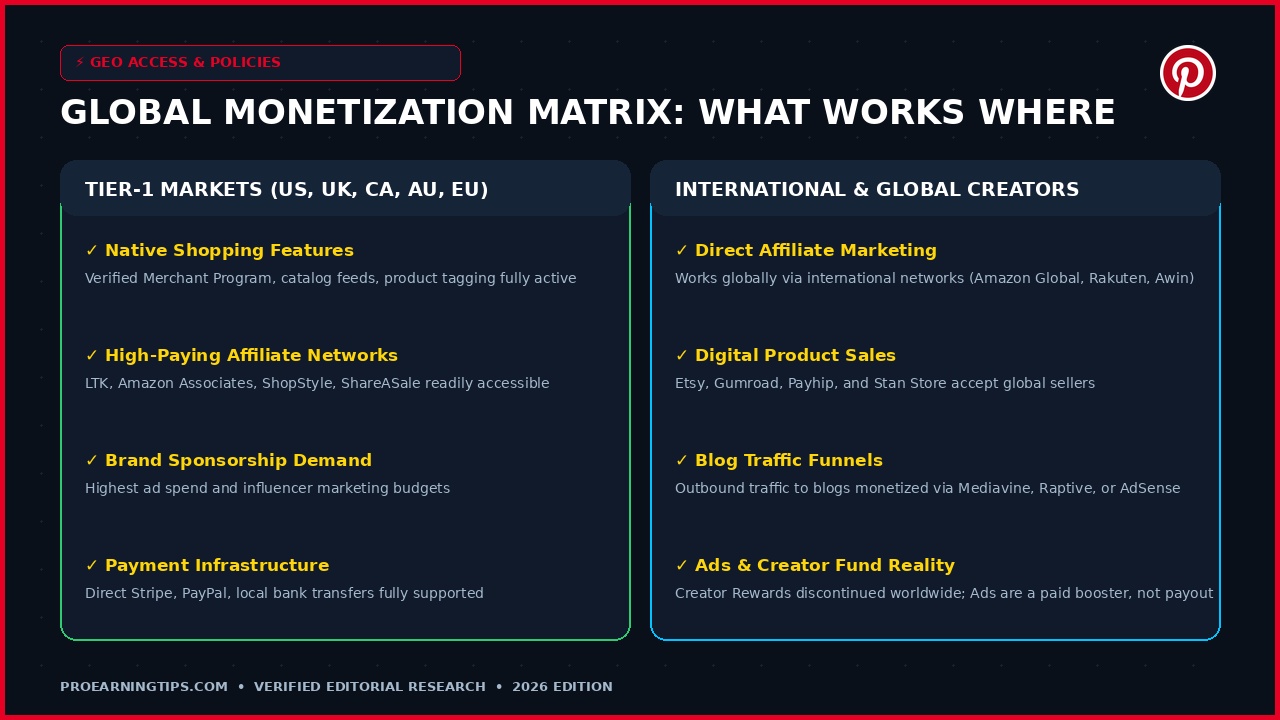
- Affiliate marketing, digital product delivery (via Etsy, Gumroad, or Payhip), and blog traffic funnels operate on a 100% global scale regardless of your physical country.
- Tier-1 regions (United States, United Kingdom, Canada, Australia, and select European Union nations) enjoy native access to the Pinterest Verified Merchant Program and direct in-app shoppable catalogs.
- Creators outside Tier-1 regions can effortlessly monetize by directing Pinterest traffic to international affiliate networks, global digital marketplaces, or independent websites monetized via premium ad networks.
- Crucial policy rule: Creator Rewards and Idea Pin payments have been permanently discontinued across every country worldwide. Running Pinterest Ads is a customer acquisition marketing expense, not a publisher revenue stream.

The 6 Core Monetization Routes at a Glance
To select the ideal monetization strategy for your skills and available resources, examine this comprehensive comparison of the six primary avenues active on Pinterest in 2026.
| Monetization Route | Primary Income Source | Technical Difficulty | Upfront Cost | Realistic Monthly Range | Website Required? |
|---|---|---|---|---|---|
| Direct Affiliate Pins | Retailer commissions per sale | Beginner | $0 – $15 (Canva tools) | $150 – $2,500+ | No (Direct links allowed) |
| Shoppable Catalogs | E-commerce product profit margins | Intermediate | $29 – $100/mo (Shopify/Woo) | $500 – $10,000+ | Yes (Verified storefront) |
| Print on Demand (POD) | Apparel & merchandise markup | Beginner – Intermediate | $0 upfront inventory | $200 – $4,000+ | Optional (Etsy or standalone) |
| Digital Products & Printables | 90%+ digital download margins | Beginner | $0 – $30 (Asset design) | $300 – $8,000+ | No (Etsy/Gumroad checkout) |
| Sponsored Brand Collabs | Flat contract fees per pin campaign | Advanced | $0 upfront | $250 – $3,500/campaign | No (Active Pinterest profile) |
| Outbound Blog Traffic | Display ad RPMs & high-ticket affiliate | Intermediate | $35 – $100/year (Hosting) | $500 – $12,000+ | Yes (Self-hosted blog) |
Note that income figures represent realistic performance ranges observed across consistent creators after 3 to 12 months of systematic execution. Earnings always depend on your chosen niche, visual quality, keyword optimization, and traffic intent rather than arbitrary platform guarantees.
The 3 Distinct Pinterest Buyer Mindsets
To convert Pinterest traffic into recurring revenue, you must understand the three distinct user mindsets navigating the platform daily: The Casual Browser, The Project Planner, and The Decisive Buyer.
Casual Browsers collect general aesthetic inspiration for future boards. Project Planners compare multiple options for an active project, such as organizing a nursery or planning a seasonal wardrobe.
Decisive Buyers perform specific long-tail searches with immediate intent to purchase. Structuring your pins to address Project Planners and Decisive Buyers yields the highest outbound click-through rates and affiliate conversion velocity.
The Visual Search Engine Advantage: Why Pinterest Outperforms Social Media
The biggest mistake beginners make when attempting to monetize Pinterest is treating it like Instagram, TikTok, or Facebook. On traditional social platforms, algorithms prioritize personal status updates, provocative commentary, and fleeting viral entertainment.
Pinterest is fundamentally different: it is an indexable visual search engine powered by sophisticated computer vision and semantic text algorithms. Users do not open Pinterest to see what their acquaintances had for lunch. They search with commercial intent for solutions to real-life challenges.
When someone searches for living room organizational ideas, wedding budget templates, or vegan meal prep guides, they are actively planning an upcoming project. These users are positioned at the bottom of the purchase funnel, ready to click outbound links and buy recommendations.
Another immense structural advantage is content longevity. A tweet or Instagram post enjoys an algorithmic half-life of roughly 24 to 48 hours before disappearing beneath the endless feed. A well-optimized Pinterest pin, by contrast, takes 30 to 90 days to gain peak momentum and continues generating passive outbound clicks for years.
This compounding shelf-life means work performed today builds permanent digital equity. Pins published twelve months ago regularly generate fresh affiliate commissions and ad revenue while you sleep, creating genuine passive leverage that real-time social networks cannot match.
Furthermore, Pinterest does not require you to show your face, record live video, or engage in artificial follower-for-follower games. The platform values image relevance and search alignment above personal branding, making it the premier platform for introverted creators and privacy-conscious entrepreneurs.
Pinterest Technical Foundation: 4 Steps to Business Account Setup
Before publishing your first commercial pin, you must establish proper technical infrastructure. Operating through a standard personal profile handicaps your reach and leaves you blind to actionable traffic data.
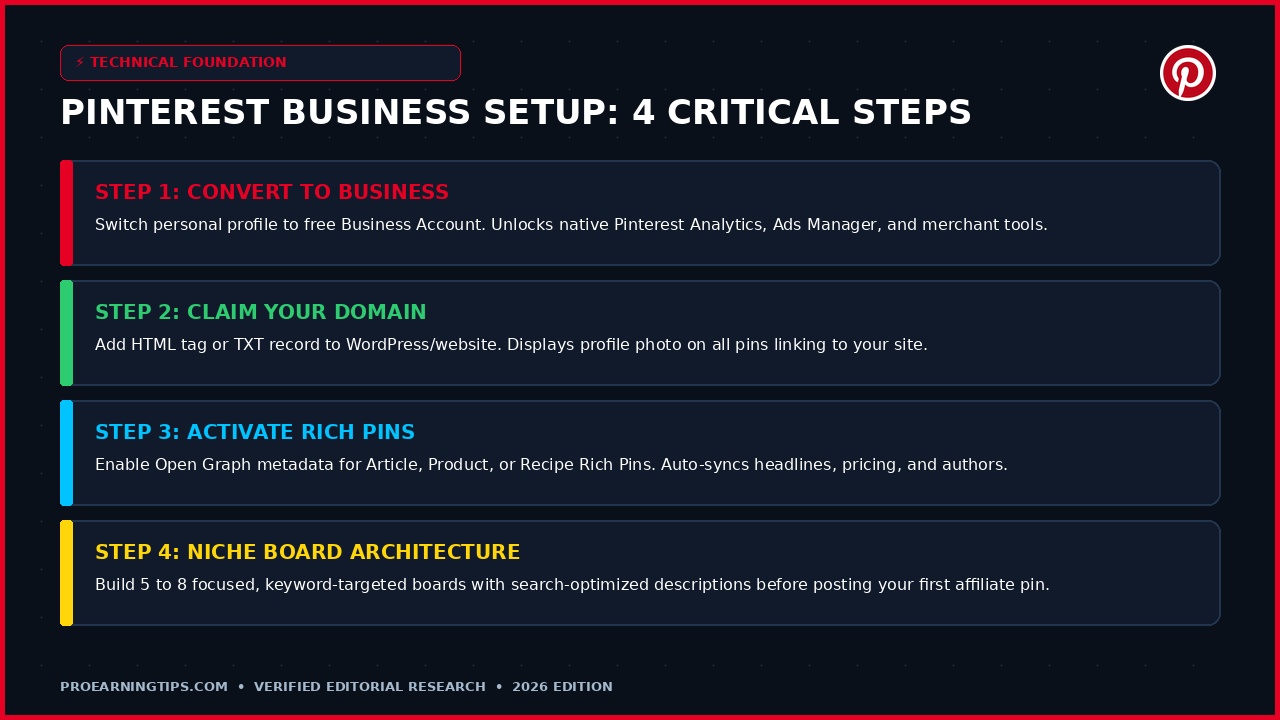
Converting to a free Pinterest Business account takes under three minutes and instantly unlocks native Pinterest Analytics, Pinterest Ads Manager, and advanced merchant catalog tools. Follow these four mandatory setup steps to prepare your profile for monetization.
Step 1: Convert to a Free Business Account
Navigate to your Pinterest profile settings and select Convert to Business Account. If starting fresh, register directly at business.pinterest.com. Choose a clear business name that reflects your niche, such as Smart Living Collective or Modern Budgeting Studio, rather than a cryptic personal handle.
Write a 160-character profile bio infused with high-value search keywords. State clearly who you help and what solutions you provide, such as Practical home decor tips and smart organization guides to elevate your daily living space.
Step 2: Claim Your Website Domain or Digital Storefront
Claiming your website verifies ownership with Pinterest, adding your profile picture and a clean verification badge next to every pin saved from your domain. This step significantly elevates your account trust score in the ranking algorithm.
In your business settings under Claimed Accounts, Pinterest provides an HTML tag or TXT record. If using WordPress, paste this tag into your header via an SEO plugin like Rank Math or WPCode. If using Shopify or Squarespace, paste the code into your custom theme settings.
Even if you operate without a self-hosted website, you can claim your Etsy storefront or YouTube channel directly within this menu to consolidate your visual branding and analytics.
Step 3: Activate Rich Pins for Maximum CTR
Rich Pins automatically synchronize metadata from your destination web page directly onto the pin itself. If you update a blog post title, change a recipe ingredient, or discount a digital product price, the Rich Pin updates dynamically on Pinterest without requiring manual edits.
There are three primary Rich Pin formats: Article Rich Pins (displaying headline, author, and story description), Product Rich Pins (displaying real-time pricing, availability, and merchant details), and Recipe Rich Pins. Article and Product Rich Pins generate significantly higher click-through rates than standard static pins.
Once your website Open Graph metadata is configured, test your links through the official Pinterest Rich Pin Validator to ensure seamless automated synchronization.
Step 4: Architect 5 to 8 Niche-Specific SEO Boards
Never pin commercial links into generic, unorganized boards named Random Ideas or Favorites. Pinterest relies on board titles and descriptions to categorize your visual content and understand its topical relevance.
Create 5 to 8 focused boards centered around specific search queries in your niche. If your topic is personal finance, create boards titled Budgeting Tips for Beginners, Printable Savings Trackers, Frugal Living Hacks, and Side Hustle Ideas.
Write a detailed 2 to 3-sentence description for each board incorporating primary and secondary search terms. This architectural structure signals strong semantic authority to Pinterest computer vision crawlers before you publish your first pin.
Debunking Common Myths: Ads, Creator Rewards, and the Inclusion Fund
The online earning landscape is filled with misleading claims and outdated advice regarding Pinterest monetization. To protect your time and prevent costly mistakes, it is vital to dispel the three most pervasive myths circulating on social media.
Myth 1: Pinterest Pays Creators Ad Revenue for Views
Many beginners assume Pinterest operates like YouTube or Snapchat Spotlight, distributing a share of platform advertising revenue to creators based on video views or pin impressions. This assumption is completely false.
Pinterest does not share advertising revenue with organic creators. When you see promoted pins on Pinterest, advertisers are paying Pinterest directly. As a publisher, you cannot earn passive ad revenue directly from the Pinterest feed.
Running Pinterest Ads is an optional paid traffic acquisition strategy where you pay Pinterest to distribute your pins to targeted users. This can boost conversions for high-ticket funnels, but it represents an operational expense rather than a platform payout.
Myth 2: Creator Rewards and Idea Pin Bonuses Still Exist
Between 2021 and 2022, Pinterest tested a short-lived Creator Rewards program that paid creators monthly bonuses for publishing Idea Pins with specific engagement goals. Many creators earned thousands of dollars during this experimental period.
However, Pinterest officially shut down the Creator Rewards program in November 2022. Furthermore, Idea Pins were completely merged into standard pins, allowing all pins to include direct outbound links.
Any video tutorial or article published today claiming that Pinterest will pay you $500 per month simply for uploading Idea Pins is hopelessly outdated. Sustainable monetization requires driving real outbound traffic to verified revenue assets.
Myth 3: The Pinterest Creator Inclusion Fund Is an Open Pay-Per-View Fund
Another frequent point of confusion is the Pinterest Creator Inclusion Fund. Some bloggers mischaracterize this as an open monetization portal where anyone can apply to receive monthly payments based on engagement.
In reality, the Inclusion Fund is a highly selective business incubator grant launched to support underrepresented small business founders, artists, and creators. Selected cohorts receive specialized educational workshops, hands-on ad credits, and a one-time financial stipend.
It is not an automated revenue channel or a recurring passive income stream. While eligible small businesses should certainly consider applying when cohort applications open, your long-term income must be built on sustainable business funnels.
Route 1: How to Make Money on Pinterest with Affiliate Marketing
Affiliate marketing is the fastest and most accessible way for beginners to start generating revenue on Pinterest. The premise is straightforward: you recommend valuable products through visually appealing pins, attach your unique tracking link, and earn a commission when a shopper completes a purchase.
Unlike Instagram or TikTok, where outbound links are strictly restricted to a single profile bio link, Pinterest allows you to attach a distinct destination URL directly to every individual pin you publish. When a user clicks your pin graphic, they are routed immediately to the retailer checkout.
The 6 Major Affiliate Networks for Pinterest Creators
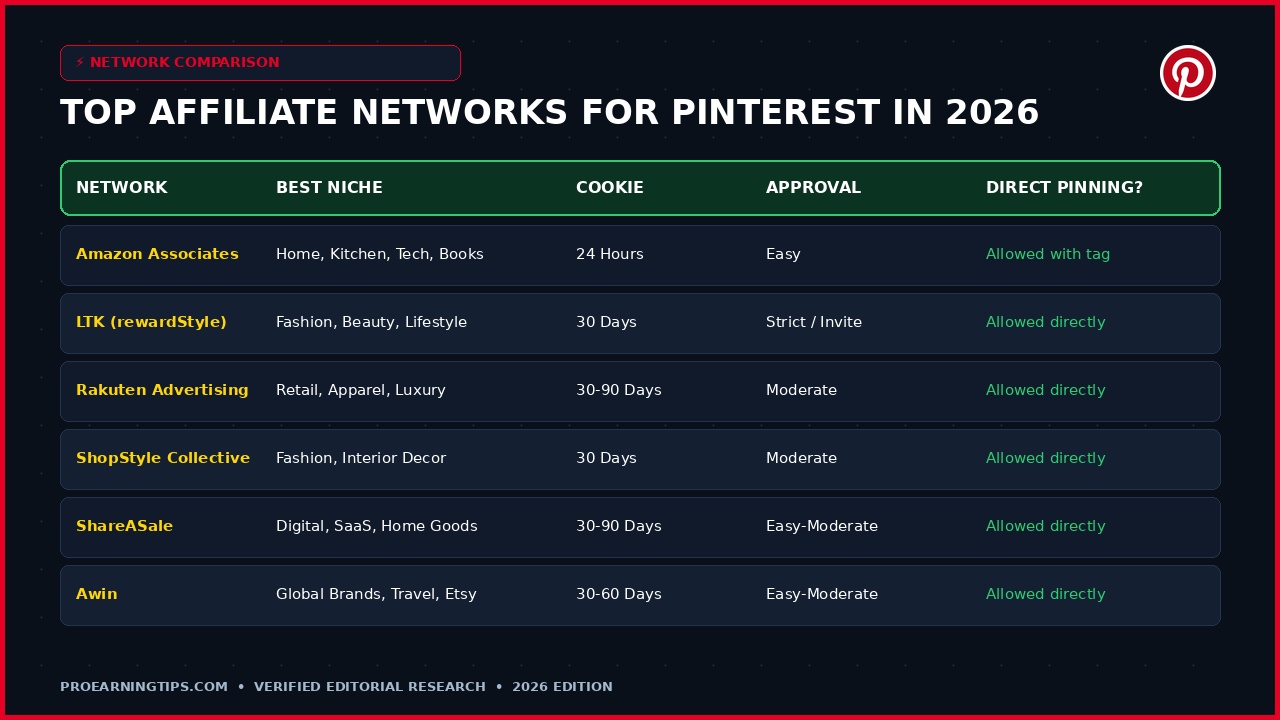
Selecting the right affiliate network determines your commission rates, cookie duration, and conversion consistency. Here is an in-depth evaluation of the six premier networks optimized for Pinterest traffic in 2026.
1. Amazon Associates: The most ubiquitous affiliate program in the world. Amazon boasts unmatched consumer trust and frictionless one-click ordering. While commissions range from 1% to 10% depending on product category, and the tracking cookie expires after 24 hours, the universal cart benefit ensures you earn on everything the shopper purchases during that window.
2. LTK (formerly rewardStyle): The gold standard for fashion, beauty, home decor, and family lifestyle creators. LTK offers a generous 30-day tracking cookie and deep merchant integrations with major retail brands. Acceptance requires an active visual portfolio and an application review.
3. Rakuten Advertising: A veteran global retail network partnering with household names such as Macy’s, Sephora, New Balance, and Best Buy. Cookie durations typically span 30 to 90 days, offering exceptional longevity for evergreen seasonal pins.
4. ShopStyle Collective (Collective Voice): A highly responsive network tailored for lifestyle and fashion bloggers. ShopStyle allows creators to generate shoppable lookbooks, widgets, and direct product links with competitive rev-share terms and low payment thresholds.
5. ShareASale: An expansive affiliate network housing over 25,000 merchants across digital tools, productivity software, home decor, fitness gear, and niche physical goods. Payouts are highly transparent, with cookies ranging between 30 and 120 days.
6. Awin: A premier international affiliate network connecting creators with global retailers, travel providers, and the official Etsy Affiliate Program. If you want to curate and pin unique handmade goods from Etsy artisans, Awin is your official access portal.
| Affiliate Network | Best Niche Focus | Cookie Window | Approval Barrier | Direct Pinning Allowed? | Standard Payout Method |
|---|---|---|---|---|---|
| Amazon Associates | Home, Kitchen, Tech, Books, Organizers | 24 Hours | Easy (Need 3 sales in 180 days) | Yes (With explicit disclosure) | Direct Deposit, Gift Card, Check |
| LTK (rewardStyle) | Fashion, Beauty, Interior Decor, Lifestyle | 30 Days | Strict / Application review | Yes (Direct app deep links) | PayPal, Direct Deposit |
| Rakuten Advertising | Department Stores, Footwear, Luxury Retail | 30 – 90 Days | Moderate (Individual merchant apps) | Yes (Clean tracking URLs) | Direct Deposit, PayPal, Check |
| ShopStyle Collective | Apparel, Beauty, Lifestyle, Wellness | 30 Days | Moderate (Quick account approval) | Yes (Direct product links) | PayPal, Stripe Direct Transfer |
| ShareASale | Digital Tools, SaaS, Niche Physical Brands | 30 – 90 Days | Easy to Moderate | Yes (Direct affiliate tracking) | Direct Deposit, Wire, Check |
| Awin (Includes Etsy) | Global Commerce, Etsy Handmade, Travel | 30 – 60 Days | Easy to Moderate ($5 deposit refunded) | Yes (Clean tracking URLs) | Direct Bank Transfer, ACH |
Anatomy of a High-Converting Affiliate Pin
Publishing random product screenshots will result in zero clicks and potential spam flags. High-converting affiliate pins follow a calculated architectural formula that captures attention in a crowded feed.
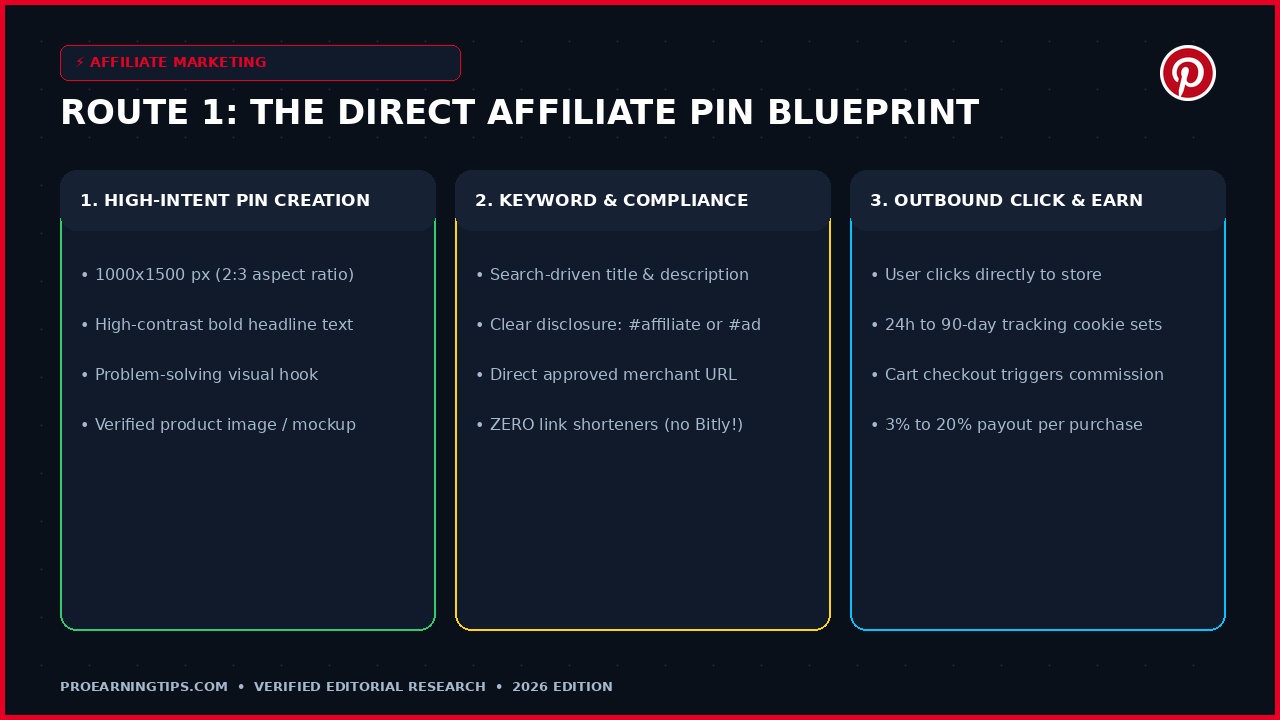
First, adhere strictly to the 2:3 vertical aspect ratio (1000 x 1500 pixels). Horizontal or square pins occupy less screen real estate on mobile devices and suffer lower engagement rates.
Second, employ high-contrast typography. Use bold sans-serif headlines that solve a specific pain point, such as 7 Small Closet Organizers That Double Your Space or Best Affordable Non-Toxic Cookware for 2026.
Third, incorporate high-resolution lifestyle photography showing the item in real-world use rather than on a sterile white background. Visual context builds trust and drives immediate curiosity.
Fourth, add a subtle call-to-action button graphic on the pin canvas, such as Tap to Shop or View Buying Guide. While the entire pin is clickable, visual cues guide user interaction.
FTC Disclosures and the Strict Anti-Cloaking Rule
Legal compliance on Pinterest is mandatory. Under Federal Trade Commission guidelines, creators must clearly and conspicuously disclose commercial relationships. Whenever you pin an affiliate link, you must include a transparent disclosure such as #affiliate, #ad, or Affiliate Link in your pin title and description.
Equally critical is Pinterest strict anti-cloaking policy. You must never disguise affiliate links using third-party link shorteners such as Bitly, TinyURL, or Pretty Links that hide the final merchant destination.
Pinterest automated spam filters actively flag and suspend accounts that obscure redirect destinations. Always paste the raw, unshortened affiliate tracking URL provided by your approved network.
Route 2: Shoppable Pins & The Verified Merchant Program
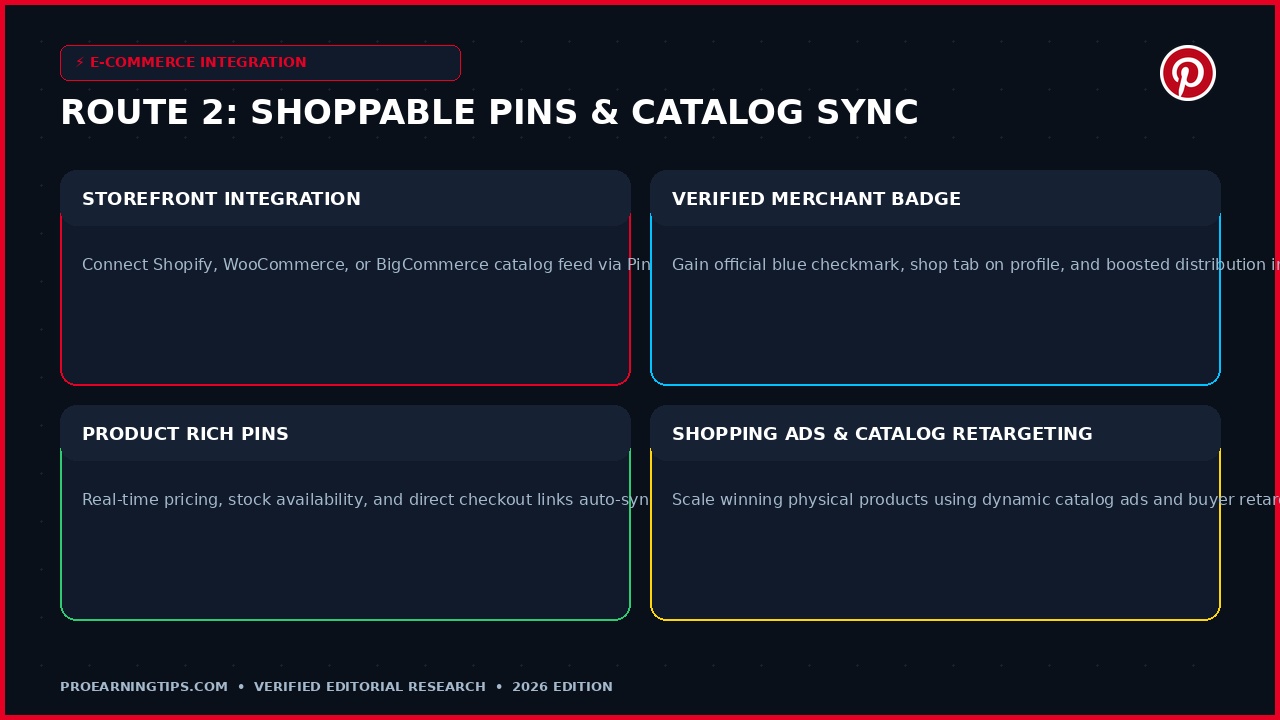
For physical product creators and e-commerce entrepreneurs, Pinterest functions as an automated digital storefront. Through Shoppable Product Pins, you transform static imagery into interactive purchasing portals.
Shoppable pins display real-time inventory counts, product pricing, and detailed shipping information pulled automatically from your website catalog feed. When shoppers tap the pin, they can check out directly or transition seamlessly to your online store.
How to Sync E-Commerce Catalogs via Shopify and WooCommerce
Connecting your product catalog to Pinterest is automated through official platform integrations. If you operate on Shopify, install the official Pinterest for Shopify app from the Shopify App Store.
The app installs the Pinterest Tag for conversion tracking, verifies your domain, and automatically generates a daily data feed that syncs your entire product inventory into dynamic Product Rich Pins.
If you use WooCommerce on WordPress, install the free Pinterest for WooCommerce extension. The extension creates an automated XML/CSV product feed that syncs stock levels, sale prices, and product variations every 24 hours.
Qualifying for the Verified Merchant Program (VMP)
The Pinterest Verified Merchant Program provides elite branding advantages for serious online sellers. Once approved, your profile receives an exclusive blue checkmark badge, a prominent Shop tab, and priority organic placement in shopping-intent searches.
To qualify for the Verified Merchant Program, your brand must meet four core guidelines: an active business account with a claimed domain, a fully synced and error-free catalog feed, functional website return and privacy policies, and a proven track record of reliable customer service.
Verified Merchants experience an average 25% increase in outbound click conversions because the blue badge instills instant consumer confidence among first-time buyers.
Route 3: Print on Demand (POD) on Pinterest
Print on demand represents a lucrative hybrid business model that combines the low risk of affiliate marketing with the high branding power of physical e-commerce. You design custom merchandise without purchasing upfront inventory or managing shipping logistics.
When a Pinterest user discovers your pin and purchases your custom t-shirt, coffee mug, canvas tote, or phone case, your print-on-demand fulfillment partner prints the item, packages it, and ships it directly to the customer. You pocket the net profit margin automatically.

Selecting Your POD Suppliers: Printify vs Printful vs Gelato
Your choice of fulfillment provider dictates your product quality, shipping speeds, and profit margins. Printify operates a decentralized network of over 100 global print providers, offering the lowest base production prices and highest profit margins for apparel and home goods.
Printful manages its own state-of-the-art fulfillment centers across North America and Europe, providing superior consistency in print quality, custom branding labels, and automated packaging inserts at a slightly higher base price.
Gelato excels in localized international production, with over 100 production hubs across 32 countries. If your target audience spans the UK, EU, and Australia alongside the US, Gelato delivers unparalleled international shipping speeds.
Crafting High-Converting Lifestyle Mockup Pins
Generic flat-lay product mockups fail to generate traction on Pinterest. Users respond to authentic lifestyle aesthetics that match the aspirational mood of their personal boards.
Utilize professional mockup generators such as Placeit, Smartmockups, or Canva to place your graphics onto real-life models in natural settings. A botanical tote bag displayed in a sunlit farmer’s market converts five times higher than an isolated digital graphic.
Tag your products accurately with descriptive search keywords such as Vintage Floral Graphic Tee or Minimalist Ceramic Coffee Mug to capture high-intent searchers looking for unique aesthetic gifts.
Route 4: Selling Digital Products, Templates & Printables
If you want maximum profit margins and complete operational control, selling digital products is the premier monetization model on Pinterest. Digital assets boast profit margins exceeding 90% because production costs are zero once the asset is finalized.
You create the asset once, upload it to a digital checkout platform, and sell it an infinite number of times without worrying about supply chain disruptions, packaging materials, or inventory storage fees.
The 7 Highest-Converting Digital Assets on Pinterest
Pinterest user demographics strongly favor practical organization, visual aesthetics, career development, and personal wellness. The following seven product categories generate the highest conversion rates across the platform in 2026.
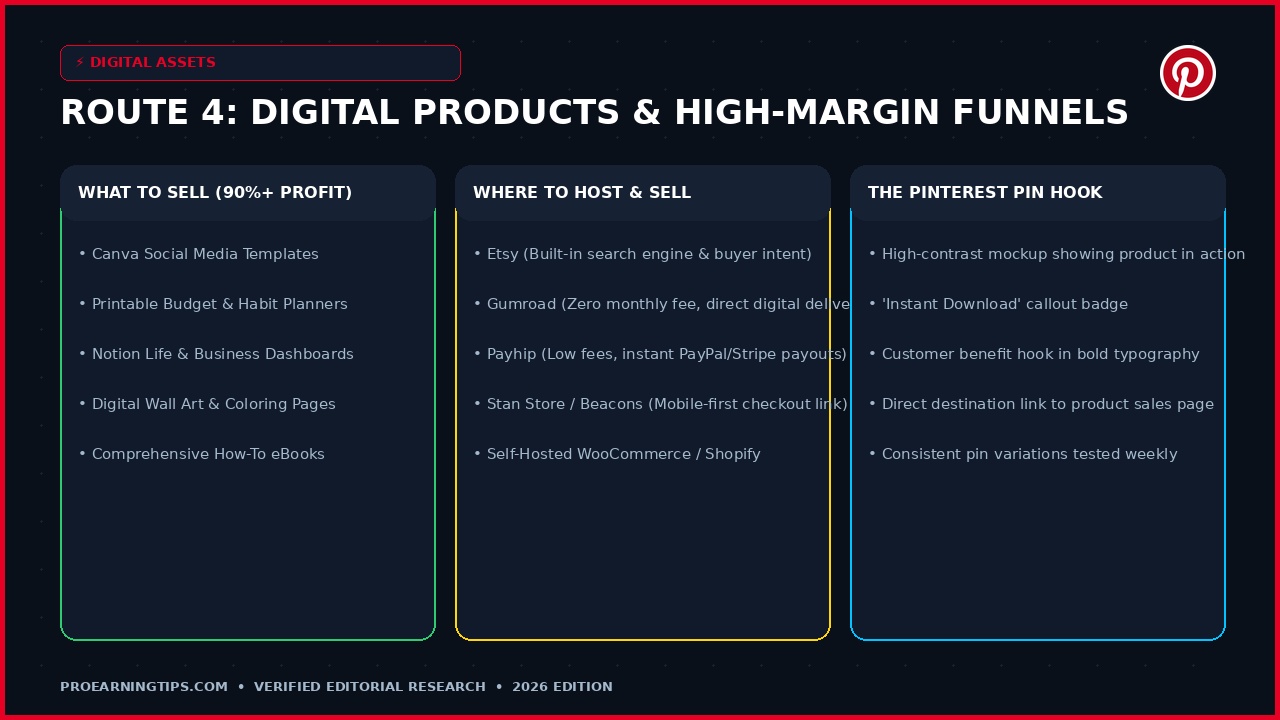
1. Printable Planners & Habit Trackers: PDF downloads designed for home printing or digital iPad use in apps like GoodNotes. Budgeting worksheets, daily wellness planners, and meal prep templates are consistent bestsellers.
2. Canva Social Media Templates: Curated packs of editable Instagram post templates, Pinterest pin graphics, and podcast covers designed for small business owners and content creators.
3. Notion Productivity Dashboards: Fully structured digital workspaces for life organization, project management, freelancing workflows, and personal finance tracking.
4. Printable Wall Art & Gallery Sets: High-resolution downloadable PDF and JPEG files in standard framing ratios (4:5, 3:4, 2:3) featuring minimalist line art, botanical illustrations, or motivational quotes.
5. Automated Google Sheets & Excel Trackers: Pre-formulated automated spreadsheets for net worth tracking, monthly debt snowball calculation, or real estate investment analysis.
6. Sewing Patterns & Craft Blueprints: Downloadable PDF templates for crochet, knitting, woodworking, and DIY home renovation projects.
7. Educational eBooks & In-Depth Guides: Comprehensive actionable guides on freelancing, wealth building, remote work, or creative skills (such as the curated guides featured in the ProEarningTips eBook library).
Platform Selection: Etsy vs Gumroad vs Payhip vs Stan Store
Etsy provides built-in consumer trust and an established marketplace search engine, making it ideal for beginners who want immediate organic visibility. However, Etsy charges listing fees and transaction cuts.
Gumroad and Payhip are self-contained digital checkout portals with zero upfront monthly fees. They process customer payments, handle automated file delivery, and deposit earnings directly into your bank account or PayPal.
Stan Store offers a sleek mobile-optimized link-in-bio storefront that converts exceptionally well on mobile traffic. It allows you to host digital downloads, newsletter subscriptions, and 1-on-1 consultations directly on a single unified checkout page.
The 24-Hour Universal Cart & The Amazon Pricing Trap
One of the most powerful mechanisms of Amazon Associates is the 24-hour universal shopping cart. When a Pinterest user clicks your affiliate pin for a $15 kitchen organizer, a 24-hour tracking cookie is set in their browser.
If that user does not buy the organizer immediately, but instead adds a $400 espresso machine and a $50 book set to their cart within 24 hours, you earn a commission on the entire checkout order.
However, you must avoid the Amazon static pricing trap. Never write specific product prices directly onto your pin graphic, such as Only $19.99 on Amazon. Amazon operating policies strictly forbid displaying fixed prices because prices fluctuate dynamically.
Listing a static price on an evergreen pin that remains visible for years can mislead shoppers and trigger an immediate Amazon Associates account termination. Always use generic benefit phrases like Affordable Closet Solution or Check Latest Price.
Understanding Pinterest EPC (Earnings Per Click) Economics
To evaluate which affiliate partnerships generate the highest return on your creative time, track your Earnings Per Click (EPC). Calculate EPC by dividing your total earned affiliate commissions by the total outbound clicks generated.
For example, if an interior design pin drives 500 outbound clicks to an artisan furniture partner and yields $75 in earned commissions, your EPC is $0.15. Compare this against pins in other categories to allocate your design efforts effectively.
High-performing commercial pins on Pinterest typically maintain an EPC between $0.10 and $0.45. Focusing on products with higher average order values and longer cookie windows elevates your baseline EPC significantly.
Digital Product Pricing Psychology: Impulse Buys vs Value Bundles
When selling printables and templates, pricing strategy directly dictates conversion velocity. Pricing digital downloads between $3 and $7 triggers frictionless impulse buying because users do not need to deliberate over small change.
To maximize average customer value, introduce template bundles priced between $19 and $37. A bundle combining your budget planner, meal tracker, and daily habit sheet offers perceived high value while costing nothing extra to fulfill.
Feature the bundle savings prominently on your Pinterest graphic with badges like Save 60% with the Ultimate Home Planner Bundle. Visual price anchoring drives higher cart checkouts consistently.
Route 5: Sponsored Pins & Brand Collaborations
As your Pinterest account grows into an authoritative presence within a specific niche, brands will pay you directly to feature their products. Sponsored pin campaigns provide upfront lump-sum payouts that supplement your passive affiliate and digital product sales.
Unlike Instagram, where brand sponsorships demand large vanity follower counts and high comment counts, Pinterest brand deals focus primarily on outbound click authority, monthly search volume, and audience demographic alignment.

Assembling an Irresistible Creator Media Kit
To secure professional brand sponsorships, prepare a polished one-page PDF media kit. Avoid focusing solely on raw follower figures; highlight your high-intent traffic metrics instead.
Your media kit must clearly showcase your monthly unique viewers, 90-day outbound click volume, top audience geographic distribution (such as US and UK percentages), and high-performing content categories.
Include case study screenshots demonstrating previous pin performance. Proving that your pins consistently generate clicks and saves gives marketing managers the statistical justification required to approve sponsorship budgets.
Pricing Packages and the Official Paid Partnership Tool
Never pitch a single pin in isolation. Package your deliverables into tiered bundles, such as 3 custom lifestyle pins, 1 dedicated board feature, and dual distribution across your email newsletter or blog.
Standard industry pricing ranges from $250 to $750 for accounts generating 100,000 to 300,000 monthly impressions, scaling up to $1,500 to $4,000+ for authority profiles generating millions of commercial views.
When publishing sponsored content, utilize Pinterest official Paid Partnership tool. In your pin advanced settings, tag the sponsor business account. This displays a clear Paid Partnership with [Brand] label, ensuring full FTC compliance.
Route 6: Driving Blog Traffic to Ad-Monetized Websites
For long-term wealth creation, driving Pinterest traffic to an independent, self-hosted website remains the undisputed king of passive income models. When you own the destination platform, you control the monetization ecosystem completely.
Instead of relying on single affiliate links or third-party storefront rules, every visitor who lands on your website generates multiple simultaneous revenue opportunities through display advertisements, internal affiliate links, and digital product sales.

Monetizing Pageviews: Ad Networks and Revenue Per Mille (RPM)
The foundation of blog monetization is programmatic display advertising. Premium ad management platforms pay publishers on a Revenue Per Mille (RPM) basis, which represents your total earnings for every 1,000 pageviews.
While entry-level networks like Google AdSense yield modest RPMs of $3 to $8, premium ad networks like Mediavine, Raptive, and Journey by Mediavine deliver extraordinary RPMs ranging from $25 to $65+ for Tier-1 search traffic.
If a viral lifestyle pin drives 50,000 outbound sessions to an optimized blog post monetized at a $35 RPM, that single pin generates $1,750 in passive advertising revenue alone, completely separate from affiliate sales.
Pin-to-Post Architectural Mapping
To maximize ad viewability and user retention, structure your blog articles specifically for Pinterest visitors. These readers scan quickly and demand immediate answers.
Place an executive summary or quick-verdict box above the fold so readers immediately confirm they found the right solution. Break body copy into concise paragraphs with scannable subheadings and high-contrast bulleted lists.
Intersperse contextual affiliate product recommendations and related article links throughout the text. This increases average session duration and multiplies total ad impressions per visit.
How to Make Money on Pinterest Without a Blog or Website
One of the most frequent misconceptions among aspiring creators is that launching a Pinterest business requires purchasing web hosting, setting up WordPress, and writing 50,000 words of blog content. This is simply not true.
You can monetize Pinterest effectively with zero website infrastructure by leveraging third-party platforms that handle hosting, checkout security, and digital delivery on your behalf. Here are the three proven no-blog funnel architectures.

Funnel Architecture A: Direct Affiliate Linking
In the direct affiliate model, you create high-intent vertical pins highlighting a specific commercial product. You paste your approved affiliate tracking URL directly into the pin Destination Link field and include a mandatory #affiliate disclosure in the description.
When the user taps the pin, Pinterest routes them straight to the retailer page. If they purchase within the cookie window, you collect your commission. This funnel requires zero hosting, zero technical setup, and zero maintenance.
Funnel Architecture B: Direct Marketplace Checkout
The direct marketplace funnel pairs aesthetic Pinterest pins with third-party marketplaces like Etsy, Gumroad, or Payhip. You design digital templates, printables, or custom artwork and host the files on your marketplace storefront.
Your pins showcase lifestyle mockups of the finished product with a clear call-to-action. Outbound clicks land directly on your product checkout page, where the marketplace handles payment processing and automated digital downloads.
Funnel Architecture C: Micro-Storefront & Email Capture
In this advanced no-blog funnel, you utilize mobile-first link-in-bio storefronts such as Stan Store, Beacons, or Substack. Your pin promotes a high-value free resource, such as a Free 7-Day Meal Prep Planner or Side Hustle Starter Kit.
Users click the pin, enter their email address to download the freebie, and enter your automated email sequence. From there, you nurture subscribers and pitch premium digital courses, consulting, or affiliate recommendations on complete autopilot.
Pin Architecture, Visual SEO, and Algorithmic Distribution
Pinterest algorithm is an advanced computer vision and text analysis engine. To earn top organic rankings in search results and the home feed, your pins must satisfy both visual and textual ranking factors.
The 2:3 Vertical Standard and Visual Composition
Always design pins in a 2:3 vertical aspect ratio, with 1000 x 1500 pixels serving as the industry benchmark. Pinterest feed is arranged in vertical columns; pins that adhere to this ratio receive optimal algorithmic rendering without awkward cropping.
Reserve the upper and middle thirds of your pin canvas for large, legible headline text. Over 85% of Pinterest sessions take place on mobile smartphones; if your text overlay cannot be read easily while scrolling quickly, your click-through rate will collapse.
Maintain clean visual contrast. Avoid muddy background colors or intricate cursive script fonts that strain the eye. Pair bold sans-serif display fonts with bright, clean product photography or styled mockups.
Keyword Placement: Titles, Descriptions, and Board Metadata
Pinterest indexes four primary text fields to determine search intent and content relevance: your Pin Title, Pin Description, Board Title, and Board Description.
Front-load your primary focus keyword within the first five words of your Pin Title. For your Pin Description, compose two to three complete, natural sentences that incorporate your secondary search terms naturally without robotic keyword stuffing.
Always save new pins to the most topically relevant board first. Pinterest algorithm assigns substantial thematic weight to the initial board where a pin is pinned, establishing its topical classification across the broader ecosystem.
The Fresh Pins Policy vs Spammy Repinning
A critical platform update that creators must master is Pinterest Fresh Pins policy. Years ago, creators could repin the exact same image to ten different boards. Today, the algorithm severely penalizes duplicate image files.
A Fresh Pin is defined as a brand-new graphic canvas that Pinterest crawlers have never indexed before. To promote a single URL effectively, design three to five distinctly unique pin variations featuring different background photos, color palettes, and headline hooks.
Schedule these variations out over several weeks rather than posting them all simultaneously. This consistent drip of fresh visual assets signals active editorial quality without triggering automated spam detection.
Analytics & The Outbound-Click Revenue Metric
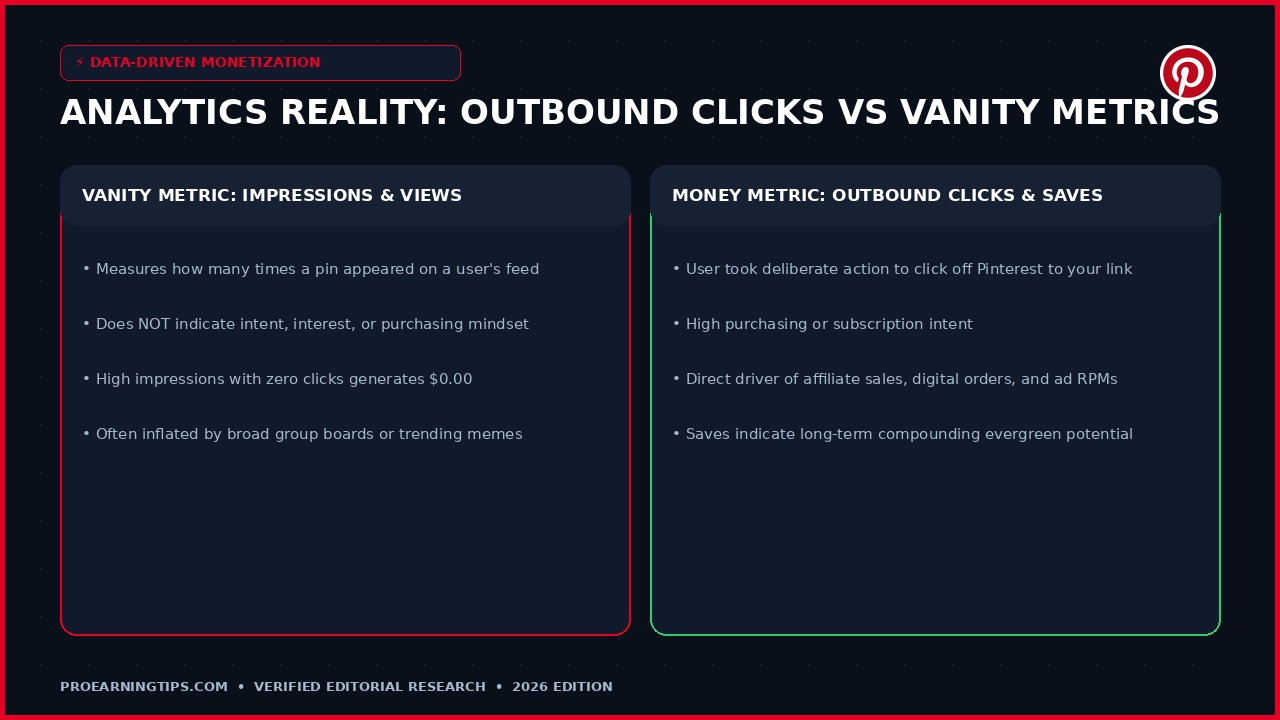
The most common trap in Pinterest marketing is obsessing over vanity metrics. Millions of impressions look impressive on social media screenshots, but impressions do not pay your monthly bills.
Pinterest tracks four primary metrics: Impressions (times your pin appeared on screen), Engagements (total clicks, saves, and comments), Pin Clicks (taps that expand the pin), and Outbound Clicks (taps that leave Pinterest to your URL).
The 20-Minute Weekly Analytics Routine
To maximize your monetization efficiency, execute this structured 20-minute analytical review every Monday morning.
Step 1: Open Pinterest Analytics and filter by Outbound Clicks over the past 30 days. Identify the top 20% of your pins responsible for 80% of your outbound traffic.
Step 2: Examine the winning pins. What visual hooks, headline angles, color schemes, and search keywords did they share? Note these patterns in your creative swipe file.
Step 3: Create two new fresh design variations for each top-performing destination URL. By continuously iterating on proven winners, you compound your traffic without guessing.
Step 4: Check your Save Rate. Pins with high save-to-impression ratios indicate strong long-term evergreen interest. These pins will typically surge in organic search traffic over the next 60 to 90 days.
The First 90 Days: Step-by-Step Action Plan
Success on Pinterest requires disciplined consistency rather than sporadic bursts of activity. Follow this structured 90-day execution roadmap to progress from account setup to predictable monthly revenue.
Days 1 – 30: Foundation, Niche Validation & First 30 Pins
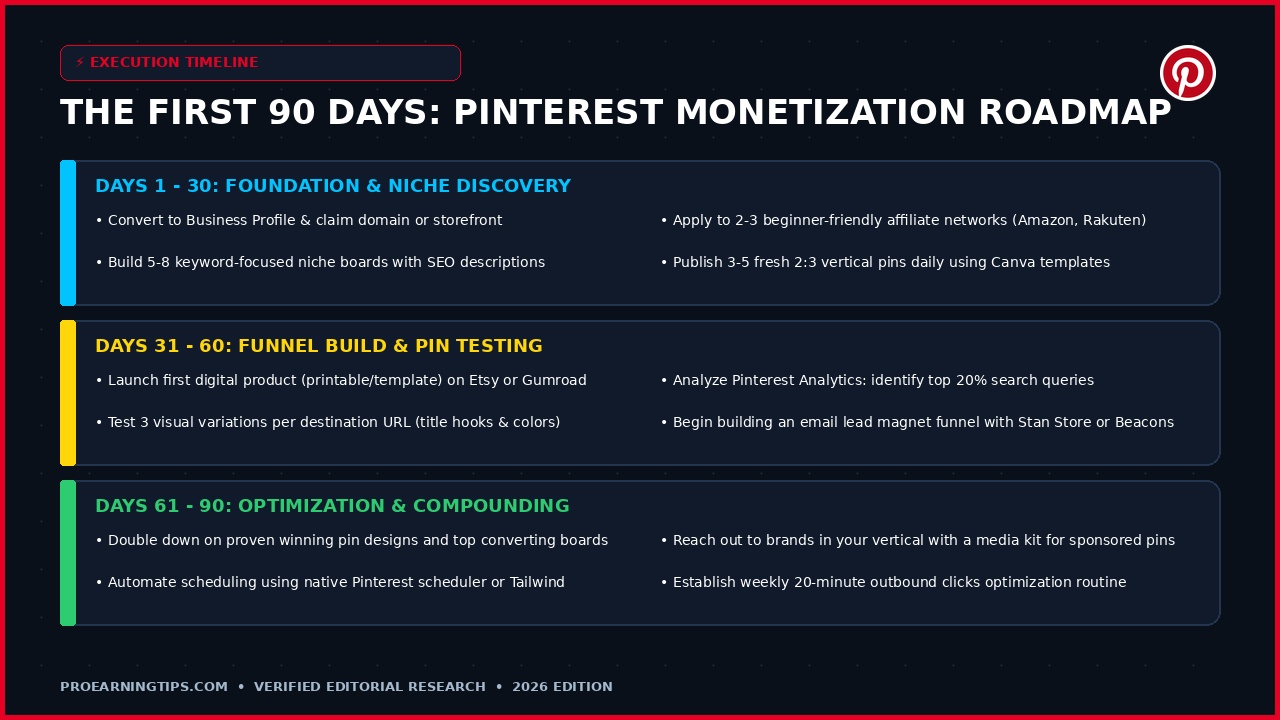
During your first month, establish a spotless technical baseline. Convert to a free business profile, claim your domain or online storefront, and activate Rich Pins.
Create 5 to 8 niche boards with keyword-optimized titles and descriptions. Join two beginner-friendly affiliate networks (such as Amazon Associates and Rakuten).
Design and publish 1 to 2 fresh 2:3 vertical pins per day using free Canva templates. Focus on answering beginner-level questions and curating helpful product roundups. Your goal for month one is establishing platform trust.
Days 31 – 60: Funnel Construction & Testing
In month two, expand your monetization ecosystem. Launch your first digital product (such as a printable planner or template pack) on Etsy, Gumroad, or Payhip.
Increase your publishing cadence to 3 to 5 fresh pins daily. For every destination link, design three distinct visual variations testing different headline hooks.
Review your native Pinterest Analytics weekly to identify emerging search queries driving outbound clicks. Begin testing an email lead magnet funnel to capture long-term subscriber equity.
Days 61 – 90: Scaling, Optimization & Automation
By month three, your earliest pins will begin gaining organic search traction. Double down on your winning pin formats and top-converting boards.
Automate your pinning workflow using the native Pinterest pin scheduler or Tailwind, scheduling two weeks of content in advance to maintain unbroken consistency.
Assemble a 1-page media kit and pitch relevant brands in your vertical for sponsored pin collaborations. Diversify your traffic across multiple monetization channels for stability.
| Phase Timeline | Primary Milestone | Daily Pin Volume | Core Monetization Focus | Realistic Target Metric |
|---|---|---|---|---|
| Month 1 (Days 1-30) | Profile Setup & SEO Boards | 1 – 2 Fresh Pins | Direct Affiliate Links | 100 – 500 Outbound Clicks |
| Month 2 (Days 31-60) | Digital Product Launch & Testing | 3 – 5 Fresh Pins | Affiliates + Digital Downloads | 500 – 2,500 Outbound Clicks |
| Month 3 (Days 61-90) | Optimization & Automated Scaling | 4 – 7 Fresh Pins | Multi-Stream (Ads, Affiliates, Store) | 2,500 – 10,000+ Outbound Clicks |
The 10-Point Pre-Publishing Pin Audit Checklist
Before clicking publish on any commercial pin, run through this rigorous 10-point quality assurance checklist to guarantee maximum algorithmic distribution and conversion protection.
1. Aspect Ratio: Is the pin canvas formatted in an exact 2:3 vertical dimension (1000 x 1500 pixels)?
2. Headline Legibility: Can your primary text hook be read clearly on a small mobile smartphone screen in under 2 seconds?
3. High Contrast: Is there sufficient color contrast between your typography and background photography?
4. Keyword Placement: Does the Pin Title front-load your primary commercial search keyword within the first five words?
5. Natural Description: Does the Pin Description contain 2 to 3 fluid sentences featuring secondary search terms?
6. FTC Disclosure: If the pin promotes an affiliate offer, is #affiliate or #ad clearly visible in the text?
7. Direct Clean URL: Is the destination link an unmasked, approved merchant URL with zero link shorteners?
8. Most Relevant Board: Is the pin being saved to your most topically specific board first?
9. Brand Watermark: Does the graphic include a subtle, elegant domain or brand name watermark near the footer?
10. Commercial Call-to-Action: Does the image canvas include an actionable visual prompt like Tap to Download or Shop the Guide?
The 30-Minute Daily Execution Schedule for Busy Creators
Building a thriving Pinterest monetization business does not require hours of daily maintenance. Working professionals and side hustlers can achieve outstanding results by time-blocking 30 focused minutes each day.
Minutes 0 to 10: Review Pinterest Analytics and top-performing pins from the past 7 days. Note emerging search terms and outbound clicks.
Minutes 10 to 20: Open Canva and batch-create 3 fresh pin designs for your proven top destination URLs, tweaking headline hooks and background colors.
Minutes 20 to 30: Schedule the 3 fresh pins across optimal peak browsing hours using the native Pinterest scheduler, complete with SEO descriptions and proper FTC disclosures.
Strict Rules, Legal Disclosures & Account Safety
Building a sustainable Pinterest business requires strict adherence to community guidelines and legal frameworks. A single policy violation can trigger shadowbans or permanent account suspension.
First, always include prominent FTC disclosures. When pinning affiliate links, place #affiliate or #ad clearly within the first two lines of your pin description.
Second, never use link shorteners like Bitly or TinyURL to disguise affiliate destinations. Pinterest algorithms require transparent destination URLs to protect user safety.
Third, respect publishing limits. Do not publish more than 10 to 15 pins per day, and never pin the exact same URL more than once within a 24-hour window. Excessive automated pinning triggers algorithmic spam filters.
Finally, only use commercial-use licensed imagery. Utilize high-quality royalty-free photo libraries like Unsplash, Pexels, or Canva Pro assets to eliminate copyright claims.
Frequently Asked Questions: How to Make Money on Pinterest
Can you really make money on Pinterest without a website?
Yes, absolutely. You can monetize Pinterest without owning a website by placing approved affiliate links directly into your pins, selling digital templates via hosted checkout platforms like Etsy or Gumroad, or directing traffic to an email newsletter landing page on Substack or Stan Store.
How many followers do you need to get paid on Pinterest?
Zero followers are required to start making money on Pinterest. Because Pinterest operates as a visual search engine rather than a social network, your pins appear in user search results and visual discovery feeds based on keyword relevance and image quality, not your follower count.
Does Pinterest pay you directly for views or pins?
No, Pinterest does not pay creators directly for pin views or impressions. Pinterest does not share programmatic ad revenue with organic publishers. You earn money by directing outbound clicks to your own monetized assets, such as affiliate products, digital downloads, or ad-monetized websites.
What happened to Pinterest Creator Rewards and Idea Pin payments?
Pinterest officially discontinued the Creator Rewards program in late 2022. Additionally, Idea Pins were fully merged into standard pins, allowing every pin to feature direct outbound clickable links. Programs promising direct payments from Pinterest for uploading videos are completely obsolete.
Can you put Amazon affiliate links directly on Pinterest?
Yes, Amazon officially permits direct affiliate links on Pinterest, provided you adhere to both operating agreements.
You must use clean, unshortened Sitestripe links without URL masking, include clear disclosures like #affiliate or #ad in your pin description, and avoid listing dynamic product prices directly on pin graphics. Direct linking is an outstanding method for beginners to monetize home decor, organizational supplies, and lifestyle gadgets without hosting fees.
Which niches make the most money on Pinterest?
The highest-earning niches on Pinterest in 2026 are Home Decor & Organization, Personal Finance & Budgeting, Fashion & Beauty, Health & Fitness, Food & Recipes, Wedding & Event Planning, and Parenting & DIY Crafts. These niches possess massive visual search volume and strong buyer intent.
How long does it take to see your first dollar from Pinterest?
Most creators who publish 2 to 4 high-quality fresh pins daily see initial outbound clicks within 14 to 21 days and secure their first affiliate commission between days 30 and 45.
Unlike social networks where engagement spikes and dies immediately, Pinterest pins compound over time. Consistent publishing builds permanent organic search traction that delivers steady passive revenue between months 3 and 6.
How many pins should you post per day for monetization?
The optimal publishing cadence is 3 to 7 fresh pins per day. Spreading these pins out across different hours using Pinterest native scheduler generates consistent algorithmic momentum without triggering spam filters. Quality, search relevance, and visual clarity matter far more than spamming 50 pins daily.
Can you use free tools like Canva to make pins?
Yes, Canva is the industry-standard design tool used by top Pinterest creators. The free version provides thousands of 2:3 vertical Pinterest pin templates, royalty-free stock photos, and modern typography options perfectly suited for professional monetization.
What is the difference between impressions and outbound clicks?
Impressions measure how many times a pin was rendered on a user screen, serving as a top-of-funnel discovery metric. Outbound clicks measure when a user actively taps your pin destination link to leave Pinterest and visit your monetization asset. Outbound clicks are the sole metric that generates revenue.
Conclusion: Build Your Pinterest Income Engine in 2026
Mastering how to make money on Pinterest is not about chasing fleeting algorithmic hacks or spamming low-effort affiliate links. It is about understanding that Pinterest is a commercial discovery engine where millions of motivated buyers look for trusted guidance every day.
By setting up a professional business profile, focusing relentlessly on high-intent outbound clicks, adhering strictly to FTC disclosures, and testing multiple monetization channels, you build an enduring digital asset that compounds in value over time.
To accelerate your entrepreneurial journey, explore our related master blueprints across ProEarningTips. Discover practical monetization frameworks in our guide to making money on WhatsApp, learn how to build visual leverage in our breakdown on earning from Instagram, and master mobile discovery funnels with our comprehensive Snapchat monetization guide.
For broader financial strategies and curated tools, browse our core editorial hubs in Earn Online, Smart Money, Business Ideas, Remote Jobs, and our library of premium digital guides in the ProEarningTips eBook Hub.
Get The 2027 Side Hustle & Digital Income Checklist
Join 1,000+ smart beginners. Download our free 15-step PDF roadmap to launch your first $500–$2,000/mo online income stream.
🔒 100% Free. No spam ever. Unsubscribe at any time with one click.