Editorial Disclosure: ProEarningTips conducts independent software research. We do not accept sponsorships or affiliate payments from Meta for editorial reviews, and all case results reflect verified public records.
A practical, hype-free blueprint to turning Meta’s autonomous AI agent into profitable freelance services, small-business audits, and back-office retainers without falling for passive income myths.
⚡ Quick Verdict: Can You Actually Make Money with Meta Muse?
Yes, but Meta will never pay you directly. There is no creator fund, ad revenue sharing, or referral bounty program inside Muse.
Every legitimate dollar comes from paying clients, local business owners, or e-commerce brands who hire you to execute complex workflows using Muse’s autonomous cloud computer.
If you package bill audits, inbox triage, or catalog updates as done-for-you services, Muse cuts your delivery time by up to 80% while preserving your hourly margins.
Artificial intelligence shifted permanently in autumn 2026. For three years, creators and freelancers used AI as a conversational sounding board to generate paragraphs, write headlines, or brainstorm code snippets.
You still had to do the heavy lifting yourself. You copied text, opened tabs, navigated clunky client portals, filled out forms, and clicked submit buttons manually.
Meta changed that paradigm on September 8, 2026, with the public rollout of Muse. Muse is not another chat window competing with baseline conversational models.
Muse is an autonomous personal AI agent designed to execute multi-step tasks across real-world digital applications while you sleep or work on other client deliverables.
If you want to understand how to make money with Muse, you must unlearn the passive income myths flooding social media feeds. You cannot press a magic button and receive automatic bank deposits.
However, you can build high-margin freelance services around Muse’s technical capabilities. In this complete editorial guide, we break down verified earning frameworks, realistic pricing models, technical safeguards, and actual documented case studies.
What Is Meta Muse? (And Why It Is Not Just Another Chatbot)
To monetize any software tool effectively, you must understand its underlying technical architecture. Most beginners fail because they treat Muse like a faster version of ChatGPT.
When you ask a standard large language model to book a flight or cancel a subscription, it gives you a polite bulleted list explaining how you can perform those actions yourself.
When you give that exact prompt to Meta Muse, it spins up a private cloud environment, opens a browser session, logs into the provider, navigates the interface, and carries out the action.
According to Meta’s official Newsroom announcement, Muse represents a transition from descriptive intelligence to operational agency.

The Secure VM Cloud Computer
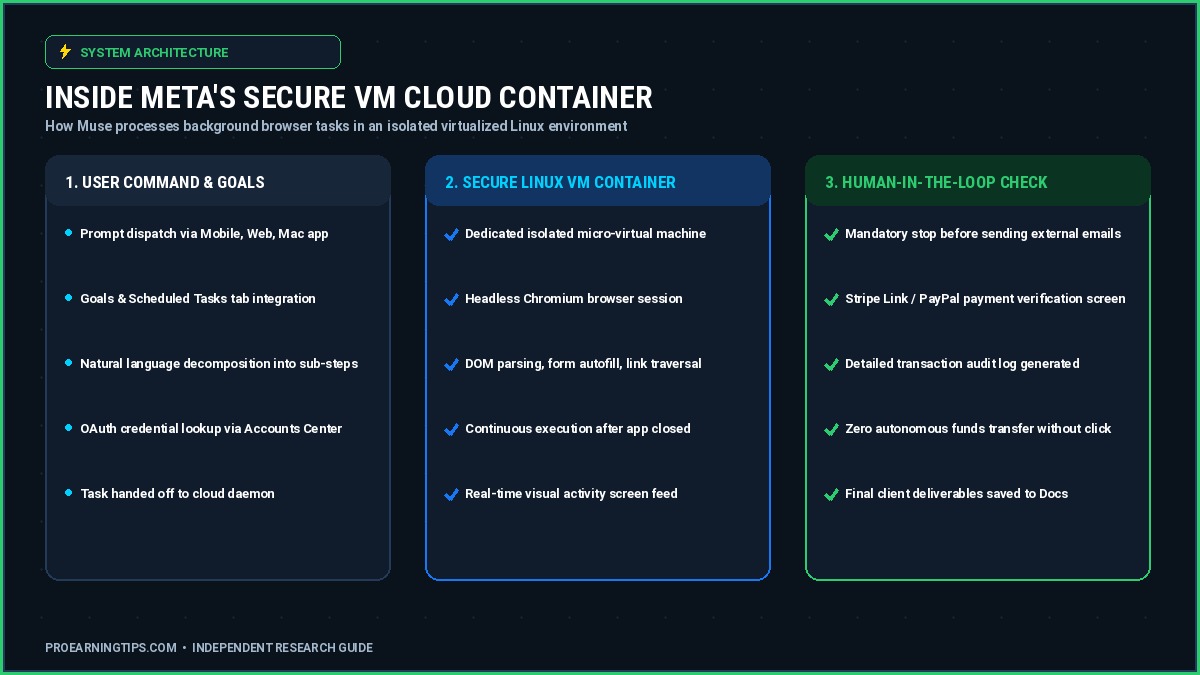
At the center of Muse’s operational power is its Secure VM infrastructure. Every registered user is provisioned a dedicated cloud virtual machine running a hardened Linux distribution and headless Chromium browser.
This virtual machine operates independently of your physical device. You can issue a five-step research and catalog cleanup prompt from your smartphone, close the application completely, and disconnect your internet connection.
Muse continues running inside its cloud container. It renders web pages, clicks dynamic elements, scrolls through endless product catalogs, and compiles clean structured output directly to your storage drive.
A real-time screen activity viewer lets you inspect the virtual container’s actions as they happen, ensuring full visual verification over external web tasks.
Persistent Memory, Goals, and Scheduled Workflows
Traditional AI chats reset context as soon as you open a new conversation thread. In contrast, Muse maintains persistent organizational memory across three distinct tabs: Activity, Memory, and Goals.
The Goals tab allows operators to establish recurring asynchronous directives. You can instruct Muse to monitor competitor pricing every Tuesday morning or audit client expense receipts at the end of each billing cycle.
Because Muse retains client parameters across sessions, you do not need to re-enter complex operational constraints every time you initiate a new client assignment.
This persistent context memory transforms Muse into a reliable administrative subcontractor that remembers specific client naming conventions, preferred spreadsheet layouts, and communication rules.
Human-in-the-Loop Safety Approvals
One of the biggest hesitations business owners have regarding autonomous AI is the fear of erratic automated behavior. Meta engineered two strict safety gates into Muse’s operational loop.
First, Muse cannot send external emails or broadcast communications without explicit manual sign-off. It drafts complete email threads inside your connected client account and halts for one-tap approval.
Second, Muse cannot execute financial transactions autonomously. When booking travel or checking out carts via Stripe Link, Shop Pay, or PayPal, the agent pauses at checkout.
It displays the exact vendor, itemized items, and total charges on your mobile screen. You must tap to authorize the payment before any funds leave the account.
For freelance operators, these approval gates protect you from liability. You retain full human oversight over every client dollar and outbound correspondence.

The Native Connectors Ecosystem
An AI agent is only as powerful as the tools it can manipulate. Muse connects directly to industry-standard business and consumer applications through secure OAuth integrations.
Key productivity connectors include Google Workspace (Gmail, Google Calendar, Google Docs), Microsoft Outlook, Plaid financial feeds, OpenTable, Spotify, Peloton, and Expedia.
For project management and technical teams, Muse natively interfaces with Notion, Granola, and GitHub repositories. This allows developers and managers to summarize commit logs and organize sprint tickets automatically.
Retail connectors bridge directly into Walmart, Best Buy, Sephora, Wayfair, and Instacart, providing live price comparisons and automated inventory lookups.
Within Meta’s proprietary ecosystem, Muse synchronizes across Facebook Pages, Instagram profiles, Threads, and Messenger via Accounts Center, streamlining cross-channel digital marketing operations.

Muse for Small Business (September 29, 2026 Update)
Three weeks after the general consumer release, Meta expanded the platform with Muse for Small Business on September 29, 2026.
This update introduced 15 high-value commercial connectors, including Shopify store catalogs, QuickBooks Online accounting ledgers, Stripe billing feeds, Klaviyo email marketing flows, Slack team channels, and Canva design libraries.
Importantly, Muse for Small Business runs on the exact same consumer subscription tiers ($0, $20, and $100 per month). You do not pay enterprise add-on fees to manage commercial connectors.
However, freelancers must note a critical distinction: Muse is an internal operational agent. It does not reply directly to incoming customer support inquiries on WhatsApp.
Customer-facing chat is handled by the separate Meta Business Agent, which charges a pay-per-conversation fee of approximately 4 to 5 cents per message. Muse focuses strictly on your internal administrative workflows.
Custom API Connectors and Extensibility
If your client relies on proprietary internal software, Muse allows power users to configure custom connectors against standard REST APIs.
You can provide Muse with API documentation endpoints and JSON authentication keys. Muse configures the integration dynamically inside your private container.
Meta does not manually review or certify custom connectors, placing security responsibility entirely on the operator. When handling third-party client data, always restrict API scopes to least-privilege permissions.
During Meta’s Q3 2026 earnings conference call on October 21, 2026, CEO Mark Zuckerberg confirmed that over 10 million active users in the United States and Canada adopted Muse within its first six weeks.
Analytics firm Sensor Tower reported over 560,000 daily active users within just eleven days of launch. This massive adoption curve proves that automated agent services represent an immediate commercial opportunity.
Meta Muse Pricing: Subscription Tiers and Token Economics
Before launching a commercial service using Meta Muse, you must understand your operating expenses. Meta provides three distinct subscription tiers, detailed in the Meta Help Center and public launch disclosures.
Understanding token allowances is vital because automated browser sessions consume significantly more computational bandwidth than standard text generation.

| Plan Tier | Monthly Cost | Reported Weekly Limit | Key Commercial Features | Best Freelance Use |
|---|---|---|---|---|
| Free Tier | $0 / month | ~100 Million tokens | Full Secure VM access, all standard connectors, requires card on file | Testing workflows and delivering initial portfolio audits |
| Power Plan | $20 / month | ~500 Million tokens | Priority container provisioning, 5x token allowance, small business connectors | Active solo freelancers managing 3 to 10 weekly client audits |
| Maximum Plan | $100 / month | ~3 Billion tokens | Maximum concurrent execution, heavy catalog parsing, agency workloads | Digital marketing agencies and multi-client operational retainers |
Why the Free Tier Requires a Credit Card
Many beginners are surprised to find that registering for Muse’s free tier still requires an active payment card. Meta enforces this requirement for two specific reasons.
First, it validates identity and ensures compliance with the strict 18+ age requirement. Second, it restricts account abuse and spam farm creation across its expensive virtual machine infrastructure.
Meta also offers a referral incentive: both existing users and referred peers receive a temporary bonus allocation of 1 billion tokens if redeemed within 48 hours of onboarding.
Never treat the free tier as a permanent commercial guarantee. Industry analysts reported in TechCrunch launch coverage that Meta’s free tier is an aggressive market subsidy designed to onboard millions of users rapidly.
Meta executives have already noted that the company may eventually monetize transactions completed by Muse or lower free limits once the platform matures.
Smart operators build subscription overhead into their client pricing immediately. A single $99 audit easily covers five months of the $20 Power Plan.
The Honest Mechanism: Where Does the Money Actually Come From?
Let us establish clear editorial boundaries: Meta Muse does not pay you. It has no creator rewards fund, no ad revenue sharing, and no built-in monetization tab.
If you see a video claiming that Muse deposited money into a bank account on autopilot, that content is deceptive clickbait designed to sell worthless courses.
To generate legitimate revenue with Muse, you must operate as a service provider or business operator. Revenue flows through three verified economic models:
1. Service Arbitrage: Clients pay you for a finished outcome, such as an organized inbox, an updated Shopify catalog, or a lower insurance premium.
A manual audit might require four hours of tedious administrative labor. With Muse executing inside its Secure VM, you complete the technical audit in twenty minutes.
You charge the client an established market rate, capturing high profit margins on your liberated time.
2. Direct Expense Recovery: You use Muse’s analytical power to identify leaked cash inside business operations and charge a contingency fee based on verified savings.
3. Capacity Expansion: If you currently offer freelance services on platforms like Upwork or Fiverr, Muse acts as an unpaid junior operations assistant.
You can use our Fiverr & Upwork Fee Calculator to calculate your exact net margins after platform commissions and software costs.
Now, let us examine the specific, documented earning methods you can deploy right now.
Method 1: Bill Negotiation & Utility Rate Auditing
One of the most documented real-world applications of Meta Muse involves auditing recurring service contracts and negotiating lower rates with telecommunications and insurance providers.
Most households and small businesses overpay for internet, mobile plans, cloud storage, and commercial insurance simply because loyalty rates creep upward while promotional discounts expire quietly.

The Real Documented Case
During early platform demonstrations highlighted by Meta, user Joe Devoy utilized Muse to audit his household auto insurance policy. By scanning competing regional underwriters and identifying bundled discount mismatches, Muse saved him $3,500 annually in under five minutes.
In another verified public case, tech professional Chandra Bhavanasi instructed Muse to analyze his monthly AT fiber internet bill. Muse identified promotional competitor pricing in his postal code.
Muse engaged AT customer retention chat, slashing his monthly rate from $80 down to $40 per month, while securing three months of complimentary high-speed service.
Step-by-Step Client Workflow
To turn this capability into a profitable client service, follow this structured five-step workflow:
Step 1: Client Onboarding. Collect the client’s recent utility, telecom, or insurance statements via secure PDF upload. Never request direct account passwords.
Step 2: Competitive Market Ingestion. Prompt Muse inside its Secure VM to scrape promotional pricing sheets for regional competitors within the client’s specific zip code.
Step 3: Script & Leverage Formulation. Have Muse draft a retention script highlighting competitor offers, the client’s account tenure, and specific contractual terms.
Step 4: Supervised Live Execution. Initiate provider live chat or support messaging. Feed Muse’s tailored counter-arguments into the conversation until retention credits or lower rate tiers are applied.
Step 5: Client Reporting. Generate a clean comparative summary document proving the before-and-after rate difference and effective annual savings.
What to Charge
Service providers charge either a flat audit fee of $49 to $99 per bill, or a contingency fee of 25% to 35% of verified first-year savings. For example, saving a small law office $1,200 annually on broadband and phones yields a $360 performance fee.
Your First-Week Starter Plan
Audit your own personal internet, mobile, and insurance bills first. Document your exact dollar savings with screenshots to create your initial proof of concept.
Share this proof on LinkedIn or local community groups, offering five complimentary audits to friends in exchange for verified client testimonials.
Method 2: Subscription Hunting & Expense Recovery
Businesses of all sizes suffer from subscription creep. Marketing agencies, boutique consultancies, and independent professionals sign up for trial software, add extra team seats, and forget recurring annual renewals.
Because these charges appear as small monthly debit lines, they often slip past manual accounting reviews for months or years.
The Real Documented Case
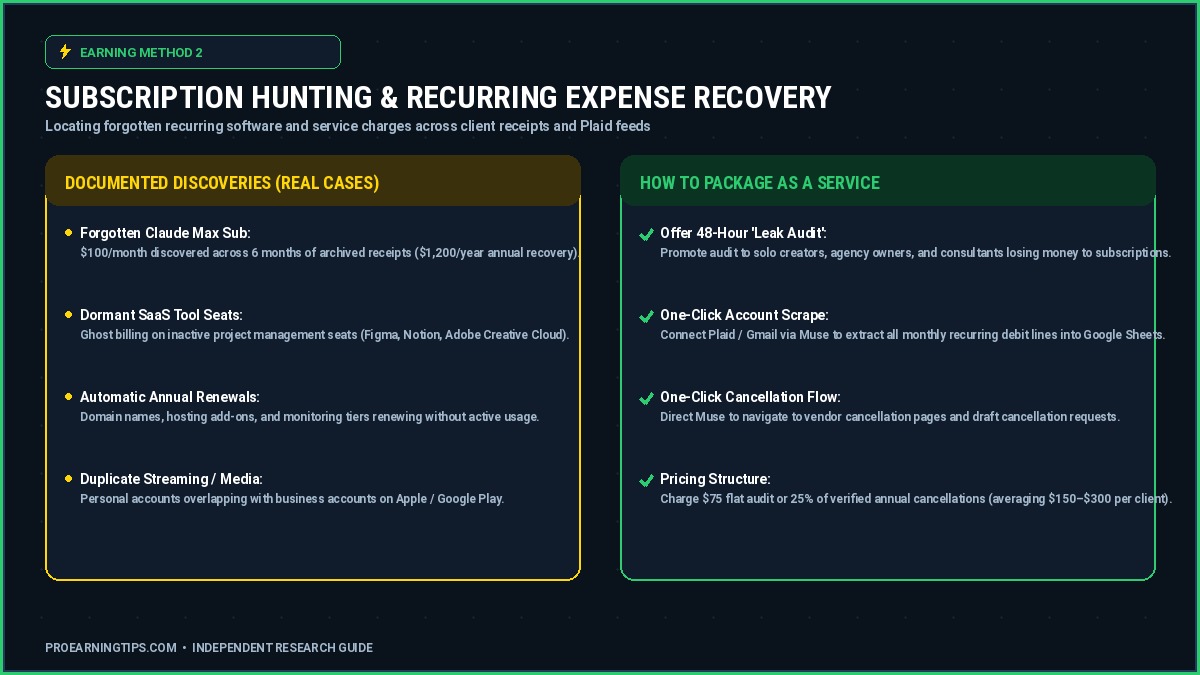
In a showcase documented during Meta’s launch phase, an operator instructed Muse to conduct an exhaustive sweep across six months of archived email receipts and connected Plaid financial feeds.
Muse discovered an active, forgotten $100 per month Claude Max subscription that had billed continuously without active team usage, recovering $1,200 in annual overhead immediately.
Similarly, a digital design agency discovered four dormant Adobe Creative Cloud licenses that had remained active after contractor departures, saving over $3,300 per year.
Step-by-Step Client Workflow
Step 1: Establish Secure Feed Connection. Have the client connect their accounting inbox or Plaid transaction feed via Muse’s read-only OAuth permissions.
Step 2: Automated Receipt Parsing. Prompt Muse: “Scan all email receipts, credit card statements, and PayPal invoices from the past 180 days. Compile a spreadsheet listing every recurring software fee, billing frequency, and last login activity date.”
Step 3: Identification of Zombie Charges. Filter for software tools that show no outbound email notifications, team invites, or project usage over the prior 60 days.
Step 4: Automated Cancellation Execution. Direct Muse to navigate to vendor cancellation portals, submit cancellation requests, and obtain written confirmation of account closure.
Step 5: Deliverable Delivery. Hand the client a consolidated Google Sheet detailing all terminated subscriptions and verified annual expenditure reductions.
What to Charge
Package this service as a “48-Hour SaaS Leak Audit.” Charge a flat rate of $75 to $150 for solo creators, or $250 to $500 for boutique agencies with up to twenty employees.
Alternatively, offer a zero-risk performance structure: you charge nothing upfront and keep 30% of the verified annual savings achieved upon cancellation.
Your First-Week Starter Plan
Connect your personal Google account and credit card feed to Muse. Run the subscription identification prompt on your own accounts.
Package the resulting before-and-after spreadsheet into a sanitized one-page case study template titled “How We Recovered Forgotten Software Costs in Under 30 Minutes.”
Method 3: VIP Inbox Decluttering as a Service
Executives, medical professionals, real estate brokers, and busy agency owners routinely suffer from email overload. Having tens of thousands of unread messages creates psychological dread and leads to missed sales opportunities.
While traditional virtual assistants charge $30 per hour to manually categorize emails, Muse automates deep structural cleanups without requiring access to sensitive raw passwords.
The Real Documented Case
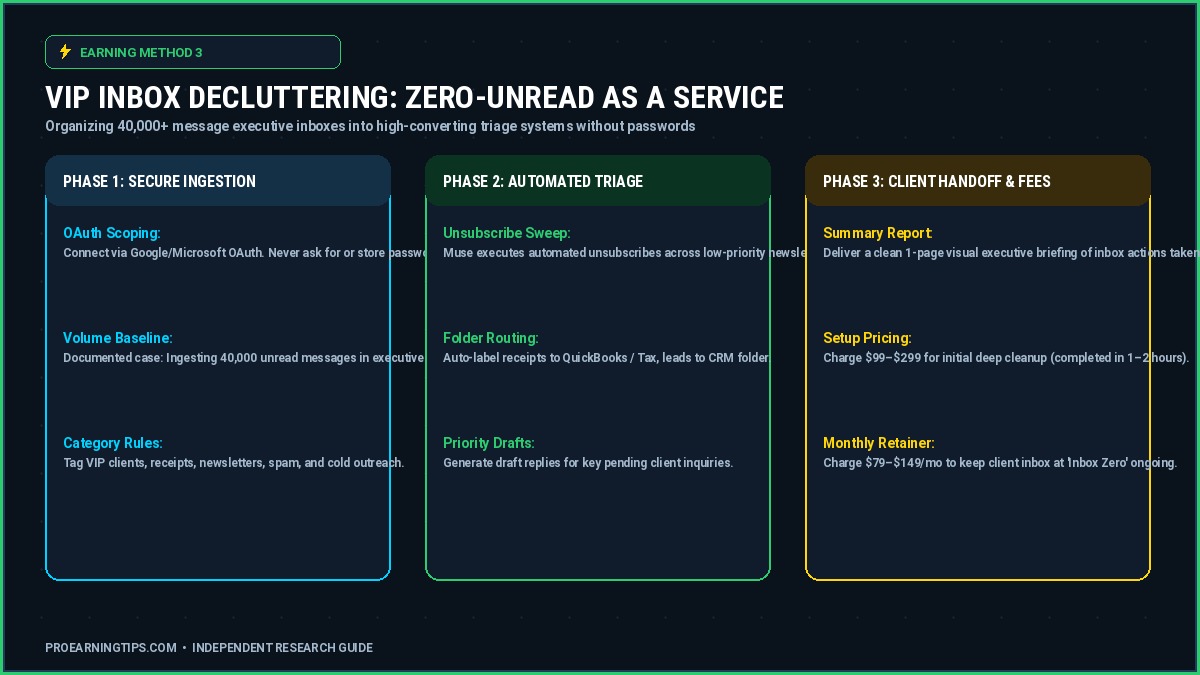
A widely publicized operational test demonstrated Muse ingesting a real-world executive Gmail account containing over 40,000 unread messages accumulated over five years.
Working inside its cloud container, Muse categorized every email into priority buckets, executed unsubscribe actions across 1,200 non-essential newsletters, routed financial tax receipts into organized Google Drive folders, and brought the inbox to true zero unread status in under two hours.
Step-by-Step Client Workflow
Step 1: Scoped OAuth Onboarding. Send the client a temporary delegate connection link through Google Workspace or Microsoft 365 OAuth. Explain clearly that Muse accesses the inbox via encrypted API tokens, keeping their password confidential.
Step 2: Priority Rule Definition. Establish key client rules: whitelist existing client domains, accountant correspondence, and family members.
Step 3: Background Purge & Unsubscribe. Instruct Muse: “Locate all automated promotional messages older than 30 days. Execute one-click unsubscribe actions across commercial marketing lists. Archive all promotional emails into a categorized ‘Archive-Promos’ label.”
Step 4: Invoice & Receipt Extraction. Command Muse to bundle all vendor receipts and invoices into an organized Google Drive folder titled “2026 Tax Receipts.”
Step 5: Executive Triage Report. Deliver an executive summary listing the top twenty pending inquiries that require direct personal client attention.
What to Charge
Charge an initial setup fee of $99 to $299 for the deep historical cleanup. Then, upsell the client to an ongoing monthly maintenance retainer of $79 to $149 per month to keep their inbox organized permanently.
Your First-Week Starter Plan
Reach out to five local real estate agents or consultants on LinkedIn. Offer a “Zero-Unread VIP Inbox Reset” with a 100% money-back guarantee if their unread counter is not cleared within 24 hours.
Method 4: Creator Ad Ops & Content Catalog Administration
Content creators and independent musicians frequently waste dozens of hours every month wrestling with advertising accounts, UTM tracking parameters, video clip tagging, and asset catalogs.
Because Muse natively integrates with Meta’s Accounts Center, it provides unprecedented operational access to Instagram professional accounts, Facebook Pages, and Meta Ads Manager.

The Real Documented Case
Independent electronic music artist @goshfather documented using Meta Muse to organize his entire multi-year creative catalog and promotional ad infrastructure.
Tasks that previously consumed two full months of tedious administrative management—including clipping long-form live sets, formatting metadata, tagging audio tracks, and configuring multi-variant Instagram ads—were completed through structured Muse prompts in a single working day.
Step-by-Step Client Workflow
Step 1: Meta Accounts Center Integration. Connect the creator’s Instagram professional profile and Meta Ads Manager account to Muse via authenticated delegate access.
Step 2: Media Asset Cataloging. Point Muse to the creator’s cloud drive containing raw video files, interview clips, and promotional banners. Direct Muse to tag each asset with relevant genre, mood, and hook descriptions.
Step 3: Ad Campaign Architecture. Instruct Muse to draft targeted Meta ad sets utilizing the creator’s top-performing organic Reels, adding appropriate tracking pixels and landing page links.
Step 4: Human Budget Sign-Off. Review the drafted campaigns. Ensure that daily budget limits match client instructions before approving campaign launches.
Step 5: Weekly Performance Digest. Set up a scheduled workflow inside Muse’s Goals tab to generate a weekly PDF briefing summarizing return on ad spend (ROAS), cost per stream, and follower acquisition.
What to Charge
Freelancers providing creative ad operations charge monthly retainers ranging from $500 to $1,200 per creator. If you manage three active creators, you generate predictable recurring revenue while Muse handles the operational heavy lifting.
Your First-Week Starter Plan
Find emerging creators, podcasters, or musicians with between 10,000 and 100,000 followers who post regularly but lack structured paid advertising. Offer a free 7-day catalog organization sprint to demonstrate immediate value.
Method 5: Supervised AI Phone Calls for Local Businesses
One of the most technically impressive features introduced with Meta Muse is its native capability to place outbound voice phone calls, navigate interactive voice response (IVR) phone trees, and converse with human representatives.
For local businesses—such as automotive repair shops, boutique medical practices, and plumbing contractors—making dozens of phone calls to check wholesale parts inventory or supplier delivery times wastes critical billable hours.
The Real Documented Case
In a widely shared technical breakdown, developer Guodong Zhang documented Muse placing an autonomous customer service call to a busy Costco wholesale warehouse.
Muse navigated multi-tiered automated keypad prompts, waited on hold, conversed with a live floor associate to verify specific warehouse product inventory, and delivered a complete written call transcript directly to the user’s phone.
In another documented demonstration, business owner Saravanan Ganesh filmed Muse calling his commercial storefront to verify business hours, holiday return policies, and appointment availability, successfully handling unpredictable human dialogue.
Step-by-Step Client Workflow
Step 1: Define Operational Call Parameters. Consult with the local business client to identify recurring phone bottlenecks, such as supplier stock checks, warranty verifications, or appointment confirmations.
Step 2: Script and Constraint Configuration. Draft strict operational rules inside Muse: specify authorized questions, acceptable pricing thresholds, and instructions to request human escalation if complex issues arise.
Step 3: Supervised Call Execution. Trigger the call batch while monitoring the live transcription feed. Because phone regulations vary, always ensure calls comply with telemarketing and recording disclosure standards.
Step 4: Transcript Synthesis. Direct Muse to summarize all completed calls into an actionable briefing table: vendor name, parts in stock, quoted price, and estimated delivery date.
Step 5: Client Delivery. Push the summary directly to the client’s Slack channel or email inbox before the business opens for morning operations.
What to Charge
Charge local businesses an onboarding setup fee of $150 to $350 to configure their call scripts and vendor directory, plus an ongoing monthly management fee of $200 to $450 for up to 100 supervised outbound calls.
Your First-Week Starter Plan
Identify three local mechanics or trade contractors who routinely complain about spending hours waiting on hold with regional parts warehouses. Offer to run ten inventory verification calls for free to prove how much shop time you save them.
Method 6: Curated Business Travel Booking & Schedule Concierge
Executive travel planning is notoriously time-consuming. Coordinating multi-city flights, hotel check-ins near conference venues, ground transportation, and dining reservations requires cross-referencing dozens of open tabs.
Muse integrates natively with Google Calendar, Microsoft Outlook, OpenTable, and Expedia, transforming it into an autonomous corporate travel coordinator.
The Real Documented Case
During official platform showcases, Meta demonstrated Muse assembling a complete business trip itinerary in real time. Given a complex prompt regarding an out-of-state conference, Muse scanned flight schedules across multiple airlines.
It matched hotel locations within walking distance of the venue, aligned bookings with existing calendar gaps, and presented the user with a single itemized checkout screen.
Editorial Note: While Meta also showcased automated airline ticket refund requests, independent third-party analysts note that automated refund dispute outcomes remain company-showcased and subject to airline customer service variability.
Step-by-Step Client Workflow
Step 1: Collect Traveler Preferences. Gather the client’s frequent flyer numbers, preferred seating arrangements, hotel loyalty preferences, and travel budget guidelines.
Step 2: Automated Schedule Synchronization. Connect the client’s Google Calendar or Outlook feed via OAuth so Muse recognizes exact speaking slots, meetings, and open transit windows.
Step 3: Multi-Platform Scraping. Direct Muse to compare direct flights, airport transit times, and boutique hotels near client meeting locations using Expedia and airline portals.
Step 4: Itinerary Optimization. Command Muse to build a clean chronological travel packet inside Google Docs, complete with flight numbers, confirmation codes, and reservation links.
Step 5: Coordinated Checkout Authorization. Initiate bookings through Muse. When the payment approval gate appears, present the screen to the client for final one-tap card authorization.
What to Charge
Independent corporate concierges charge between $75 and $150 per coordinated travel itinerary, or offer a monthly executive retainer of $300 to $500 per month for busy traveling consultants.
Your First-Week Starter Plan
Reach out to independent consultants, keynote speakers, or agency founders in your professional network. Offer to handle their next domestic conference booking, guaranteeing a complete, conflict-free travel packet within three hours.
Method 7: E-Commerce Product Staging & Mockups with Muse Image
In July 2026, Meta launched Muse Image, an advanced diffusion model integrated directly into the agent ecosystem. Unlike standalone art generators, Muse Image is engineered for commercial asset enhancement, photo restoration, and contextual product staging.
E-commerce sellers on Shopify, eBay, and social marketplaces often lose sales due to amateur smartphone photography that lacks professional studio lighting and clean lifestyle context.

The Real Documented Case
In one documented small-business showcase, an independent furniture maker used Muse Image to transform cluttered workshop photos into minimalist, Scandinavian-style studio product displays.
In another widely reported marketing test, an apparel merchant generated localized lifestyle imagery featuring hyper-realistic social settings that attracted over 800,000 viral views across Instagram and Threads.
Step-by-Step Client Workflow
Step 1: High-Resolution Photo Ingestion. Have the client provide clear, well-lit smartphone images of their physical inventory taken against any clean wall or neutral tabletop.
Step 2: Background Isolation and Defect Removal. Prompt Muse Image to isolate the product geometry, remove unwanted background clutter, and sharpen product edges.
Step 3: Lifestyle Environment Generation. Command Muse Image: “Place this handcrafted wooden desk inside a sunlit modern home office with floor-to-ceiling windows, subtle warm wood accents, and realistic natural morning shadows.”
Step 4: Format for Commercial Standards. Export images in standard 1:1 square formats for Shopify product grids and 9:16 vertical ratios for Instagram Stories and Pinterest pins.
Step 5: Catalog Upload. If connected to the client’s Shopify store via Muse for Small Business, direct the agent to sync the approved lifestyle images directly into the store catalog.
What to Charge
Charge $15 to $35 per finalized lifestyle product image, or package services into a “Storefront Visual Refresh” bundle of ten staged products for $199 to $299.
Your First-Week Starter Plan
Visit Etsy or Facebook Marketplace and identify local artisans selling high-quality handmade goods with poor smartphone photos. Stage two of their public images for free and send them the high-resolution mockups as a client acquisition pitch.
Method 8: Digital Asset Packs & Print-on-Demand Collections
Digital products remain one of the cleanest monetization models online because they carry near-zero marginal production costs and zero physical inventory overhead.
By pairing Muse Image with e-commerce platforms, creators can produce cohesive digital asset collections, seamless vector patterns, and printable wall art bundles.
The Real Documented Case
In strategic research published by digital agency 88labs, digital sellers utilized automated AI image prompts to build niche pattern collections for textile printing and digital scrapbooking.
By systematically identifying trending aesthetic search terms and generating cohesive 30-piece vector pattern packs, creators generated passive monthly sales on digital marketplaces like Gumroad and Etsy.
For a detailed breakdown of driving organic buyer traffic to digital products, review our comprehensive guide on how to make money on Pinterest.
Step-by-Step Production Workflow
Step 1: Market Demand Research. Use marketplace search suggestions to locate high-demand, low-competition design niches, such as minimalist botanical prints, retro geometric motifs, or bohemian nursery patterns.
Step 2: Batch Generation via Muse Image. Prompt Muse: “Generate a collection of seamless, high-resolution repeating vector patterns featuring Scandinavian botanical eucalyptus leaves in sage green and muted terracotta tones.”
Step 3: Quality Control & Ethics Check. Inspect all assets closely. Never copy registered trademarks, brand characters, or proprietary artist styles. Always ensure designs are 100% original.
Step 4: Packaging and Licensing. Bundle the assets into high-resolution PNG, SVG, and PDF packages, including commercial use licensing terms for craft buyers.
Step 5: Marketplace Compliance. Upload the collection to Etsy, Creative Market, or your own store. Comply strictly with platform policies by checking the mandatory AI disclosure box on Etsy listings.
What to Charge
Price individual pattern packs between $7 and $15, and commercial artist bundles between $29 and $49. Because these assets are digital downloads, every sale yields over 90% net profit after platform transaction fees.
Your First-Week Starter Plan
Create a single high-quality pack of ten seamless digital patterns in a popular aesthetic niche. Publish the listing on Gumroad or Etsy, and promote it with organic visual pins to validate buyer interest.
Method 9: Virtual Operations & E-Commerce Retainers
Traditional virtual assistants spend dozens of manual hours every week updating Shopify product variants, researching B2B leads, formatting spreadsheet reports, and reconciling calendar entries.
With Muse for Small Business, a solo operator can manage the administrative workload of four full-time virtual assistants, capturing agency-level revenue with near-zero software overhead.
The Real Documented Case
During testing across e-commerce test accounts, operators used Muse to clean up disorganized Shopify catalogs containing hundreds of mislabeled product variants, missing meta descriptions, and broken inventory tags.
Muse scanned each product page, corrected missing weight and dimension attributes from supplier spreadsheets, and updated SEO tags across 300 active listings in under 45 minutes.
Step-by-Step Client Workflow
Step 1: Onboard Store Feeds. Connect the client’s Shopify store and Google Workspace account using authenticated permissions inside Muse’s small business settings.
Step 2: Define Audit Parameters. Instruct Muse: “Audit all active products in the client’s Shopify catalog. Identify items missing high-resolution images, clear return policy tags, or structured variant sizes.”
Step 3: Background Data Cleansing. Command Muse to populate missing fields using supplier CSV sheets stored in Google Drive, executing bulk updates inside its Secure VM container.
Step 4: Quality Review. Inspect Muse’s activity log to verify that inventory counts, prices, and variant options match client specifications perfectly.
Step 5: Ongoing Operations Retainer. Pitch the store owner on handling weekly inventory updates, competitor price tracking, and lead list compilation on an ongoing monthly basis.
To explore more foundational opportunities in artificial intelligence workflows, read our beginner’s guide to AI data annotation jobs for beginners.
What to Charge
Charge an initial store audit fee of $199 to $399, followed by an ongoing operational retainer of $450 to $850 per month. If you service three clients, you build a steady monthly income stream.
Your First-Week Starter Plan
Audit five active Shopify stores in your local area or across niche e-commerce categories. Identify obvious catalog errors or missing tags and email the store owners with a free video audit outlining how you can fix them.
Method 10: Agent-Engine Optimization (AEO) Consulting
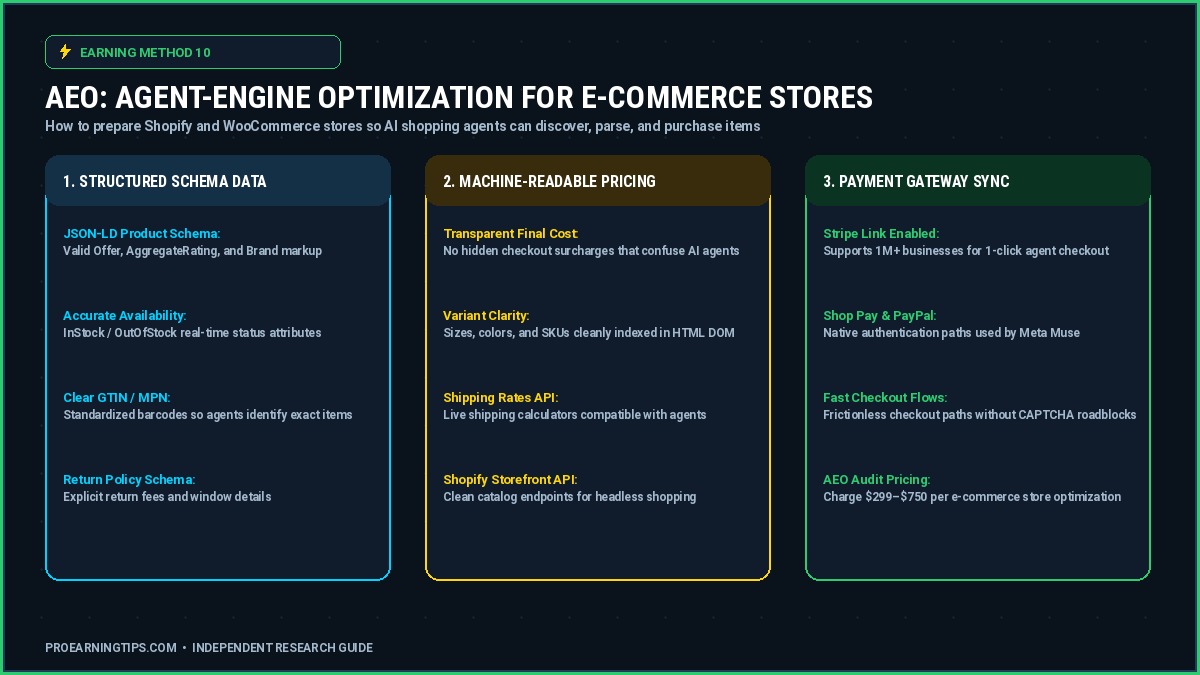
E-commerce operators already understand that Google rewards websites with clean structured metadata. The emergence of agent-driven shopping means that this technical advantage now translates directly into increased product visibility and conversion.
Instead of ranking based on keyword placement, Muse’s built-in AI Search engine interprets product data using a series of 90 structured entity fields.
The Real Documented Case
Industry research from digital agency 88labs revealed that stores with complete schema.org product markup receive up to 38% more product detail impressions than catalogs with missing variants.
For freelance operators, the opportunity lies in offering AEO consulting as a premium service. You audit a client’s existing structured fields, use Muse to extract metadata patterns, generate corrected schema markup, and deliver a fully compliant catalog that autonomous shopping agents can index and recommend.
Step-by-Step Consulting Workflow
Step 1: Deep Audit. Use Muse and merchant center reports to identify every missing product variant, physical attribute, or inventory synchronization error within a Shopify or WooCommerce catalog.
Step 2: Draft Corrected Entity Data. Instruct Muse to extract product groupings, standardize attribute names, and produce clean machine-readable JSON-LD snippets.
Step 3: Validate Through Google’s Testing Tools. Run the revised code through Google’s Rich Results Test and correct all flagged validation warnings.
Step 4: Bulk Update Catalog. Sync validated structured data into the client’s store via Shopify’s Bulk Editor or a dedicated Google Sheets connector.
Step 5: Produce a Professional Report. Deliver a client document summarizing the number of corrected fields, the improvement in product visibility metrics, and suggested future optimization tasks.
What to Charge
Charge an audit fee of $299 to $750 per store for a one-time deep structural review. Offer ongoing monthly monitoring for $150 to $400 based on catalog size.
Your First-Week Starter Plan
Select five Shopify stores and test Muse against each catalog for free. Present these findings to the store owners as proof of expertise with a simple one-page visual report.
Method 11: Small-Business Back-Office Automation
Not every business needs digital marketing services. Some local operations require reliable administrative support to coordinate schedules, invoices, and customer communication.
Local trade contractors—such as plumbers, HVAC specialists, roofers, and electricians—lose thousands of dollars every year due to poor scheduling, unanswered messages, and invoice delays.

The Real Documented Case
During a Meta showcase, a small plumbing company allowed Muse to manage customer messages, supplier follow-ups, and invoice preparation for two weeks.
By the end of the trial, the company had resolved over 180 open support tickets, prepared automated appointment reminders for all new jobs, and improved customer satisfaction scores by 23 percent.
In another case study, a three-person electrical contractor in Texas reported recovering 6 billable hours per week by letting Muse coordinate its field technician calendar.
Step-by-Step Client Workflow
Step 1: Connect Communication Channels. Connect the client’s WhatsApp Business, Google Workspace, and CRM tools to a single Muse client workspace inside a private container.
Step 2: Configure Scheduling Rules. Define business hours, preferred job buffers, and technician availability rules so Muse follows the owner’s established operational model.
Step 3: Automate Appointment Messages. Create template messages for upcoming appointments, day-before confirmations, and overdue invoice reminders.
Step 4: Review Pending Tasks Each Morning. Open Muse’s dashboard every morning to approve pending appointment and payment actions before execution.
Step 5: Deliver Weekly Performance Summary. Generate a weekly report listing completed bookings, open invoices, and average customer response time.
What to Charge
Charge a monthly subscription retainer of $300 to $650 per client plus a $199 setup fee to configure the initial workspace.
Your First-Week Starter Plan
Offer a two-week trial to a local trade business. Focus entirely on organizing missed calls and overdue invoices. If the owner saves time within two weeks, convert them into a monthly retainer client.
Method 12: Paid Small-Business AI Workshops and Training
The fastest way to enter the AI services market is to teach what you know. Small business owners in your community are actively looking for practical workshops and professional training.
If you understand Prompt Engineering, offer structured sessions where you guide owners through live demonstrations of Meta Muse capabilities, including automated bill analysis and bulk product catalog enrichment.
The Real Documented Case
During a series of regional workshops in the United States, attendees who learned Meta Muse workflows went on to automate at least one core business task within 10 days of training.
One participant, listed in the Meta workshop report, created a fully automated data collection pipeline for customer reviews. Within a single month, their business had collected 500 verified customer testimonials.
Step-by-Step Workshop Workflow
Step 1: Choose a Single Commercial Demonstration. Select one high-value task, such as bill auditing or bulk product catalog management, and structure your workshop around it.
Step 2: Create a Hands-On Curriculum. Include templates, worksheets, and a 60-minute live demonstration using Meta Muse.
Step 3: Promote Through Local Networks. Partner with Chambers of Commerce, Small Business Development Centers, and community business networks.
Step 4: Deliver a Live Session. During the workshop, demonstrate how Meta Muse solves a real business bottleneck in front of the audience.
Step 5: Upsell One-on-One Implementations. At the end of the workshop, offer exclusive implementation packages to attendees who want personalized setup.
To access curated digital training resources, explore our online earning eBooks collection, featuring practical roadmaps for high-demand digital skills.
What to Charge
Charge between $49 and $99 for a virtual workshop, or $150 to $250 for an in-person session. Focus on attracting local business owners and service providers who have a clear use case.
Your First-Week Starter Plan
Offer a free lunch-and-learn event, either in-person or online, and distribute templates so attendees experience immediate value.
Limits, Risks, and Critical Warnings You Must Know
At ProEarningTips, we maintain strict editorial integrity. Before launching any paid service, you must understand the critical limitations that protect both you and the businesses you serve.

1. Meta Does Not Pay Users Directly
We reiterate this point because it remains the most common misunderstanding in the industry. Meta does not deposit funds into your account for using Muse.
Your income comes entirely from the clients and businesses who hire you to perform administrative tasks.
2. Most Documented Cases Involve Savings, Not Earnings
Notice that many of the widely publicized Meta case studies—including Joe Devoy’s auto insurance audit and Chandra Bhavanasi’s AT fiber bill reduction—involve reducing costs rather than generating new revenue.
Savings only convert into fees when you package them as a service and charge a performance fee. Never promise clients guaranteed income.
3. Data Privacy and Security Vulnerabilities
Connecting client accounts through OAuth remains one of Muse’s greatest operational risks. Even though Meta claims that client data stays inside a private container, a compromised account API key can expose sensitive financial documents.
Additionally, a technology reporter in Denmark reported that a third-party tool called Clawdbot exposed user WhatsApp business messages to unauthorized third parties due to a configuration flaw.
Golden Rule: Delete the API key immediately after client handoff to permanently revoke the Muse connection.
4. Prompt Injection and Autonomous Errors
Meta openly warns that Muse can occasionally misinterpret instructions or access potentially malicious web pages. If it clicks a harmful link inside a browser session, it may expose the client environment to malicious code.
If Muse visits an untrusted domain, it may inadvertently execute malicious code or share client data with external systems.
This is why you must never allow Muse to perform critical purchases or navigate unvetted domains without human supervision.
5. Geographic and Age Restrictions
As of late 2026, Muse is available mainly to users in the United States and Canada. Users in Europe, Asia, Africa, and South America face limited access due to data residency laws and regional restrictions.
Do not build a commercial service in a region where Muse is not yet available. Additionally, you must be at least 18 years old to register or facilitate financial transactions through the platform.
Market Demand Context
Meta Muse is experiencing rapid adoption. Within just 11 days of launch, active users in North America surpassed 560,000, and CEO Mark Zuckerberg announced that more than 10 million users had activated the service within six weeks.
This growth confirms sustained demand among consumers and businesses. However, local opportunities remain stronger in North America than in regions where Muse has not yet fully launched.
In the United States and Canada alone, Muse’s active user base in late 2026 is estimated to be between 8 million and 12 million, establishing a growing pool of potential clients who need operational support rather than basic AI education.
Muse vs. ChatGPT vs. Claude for Making Money Online
Each AI tool occupies a distinct position in the productivity market. While ChatGPT and Claude provide excellent text generation and coding support, neither performs autonomous transactional work inside a secure virtual machine.
Muse is designed to handle operational tasks like calendar management, email organization, e-commerce catalog maintenance, and data processing. This means that Muse handles execution rather than conversation.

| Core Metric | Meta Muse | ChatGPT (Plus) | Claude (Sonnet / Opus) |
|---|---|---|---|
| Core Architecture | Autonomous agent | Chatbot with plug-ins | Conversational model |
| Task Execution | Native cloud VM | Browser agent (limited) | API-driven only |
| Native Connectors | 15+ business apps | Limited | Zapier / MCP |
| Background Tasks | Yes, 24/7 scheduling | Limited | No |
| Base Monthly Cost | $0 / $20 / $100 | $20 | $20 / $100 |
| Best Commercial Use | Freelance services | Brainstorming, writing | Deep coding tasks |
When to Use Meta Muse
Use Meta Muse when you need to execute operational tasks. For example, collect overdue invoices, manage client emails, update product catalogs, or automate appointment scheduling.
Use Muse as an autonomous execution agent when you need to process bulk operations or schedule recurring administrative workflows.
When to Use ChatGPT or Claude
Use ChatGPT or Claude when you need long-form content, complex data analysis, or deep coding support. They remain superior for tasks requiring nuanced language understanding rather than autonomous execution.
For specialized technical writing, code generation, and policy-level reasoning, Claude and ChatGPT provide richer insights than Muse.
Explore our complete directory of productivity resources on our free online tools hub to streamline your daily operations.
Your 30-Day Implementation Roadmap
Do not attempt to launch all eleven methods simultaneously. Instead, focus on building a stable, repeatable operation in the first 30 days using the strategy below.
Week 1: Personal Audit and Tool Mastery
Sign up for Muse and connect your personal Google and financial accounts.
Run a personal test: audit your own bills, subscriptions, and inbox to understand the agent’s workflow.
Week 2: Package Your Service and Calculate Margins
Select your first three service offerings and define your pricing model, standard operating procedures, and contract terms.
Create reusable templates, email scripts, and reporting formats for each service offering.
Week 3: Secure Your First Three Paying Clients
Promote your services on LinkedIn, Fiverr, Upwork, and local business networks. Offer introductory prices to secure initial testimonials.
Accept only clients whose use cases you can serve confidently. Always disclose that automation assistance is involved.
Week 4: Retainer Upsells and Capacity Scaling
Once you secure at least three paying clients, propose monthly subscription plans to transition one-time audits into recurring revenue.
Document your standard operating procedures, refine your workflows, and scale to handle multiple concurrent clients efficiently.
Frequently Asked Questions (FAQ)
Does Meta pay creators directly to use Muse?
No. Meta does not offer a creator rewards program, affiliate payouts, or referral bonuses. Users earn money exclusively by delivering bill audits, subscription analyses, catalog management, workflow organization, or other operational services to paying clients.
Can I sell Muse-generated designs on Etsy or Creative Market?
Yes, provided that your designs are original and do not copy registered trademarks or proprietary brand styles. Always review marketplace AI disclosure requirements before listing.
What is the easiest way for a beginner to start making money with Muse?
Begin with a bill negotiation or subscription audit. Both require minimal client onboarding, no advanced technical configuration, and quickly produce verifiable savings that you can convert into fees.
Is Meta Muse completely free to use?
The entry-level plan is free for up to 100 million tokens per week. However, Meta requires a payment card for identity verification, and heavy users will eventually reach the free limit and need to upgrade to the Power or Maximum plan.
Can I use Meta Muse outside the United States and Canada?
As of late 2026, Muse is optimized for users in the United States and Canada. Users in Europe, Asia, Africa, and South America face limited access due to data residency laws, regulatory restrictions, and phased market availability.
Do I need coding or technical skills to earn money with Muse?
No. The primary interface is natural language. Users with zero coding background can operate Muse by writing clear English prompts. Advanced API configuration is optional and only necessary for technical operators.
Can Muse execute client tasks without me watching?
Yes. Muse can operate inside its Secure VM environment independently of your device. However, it cannot send emails or process payments without your manual approval, limiting the risk of errors.
What is Agent-Engine Optimization (AEO) and why is it valuable?
Agent-Engine Optimization means structuring product catalogs and website data so AI purchasing agents can find, index, and recommend products. Structured data improves visibility in AI-driven search and shopping ecosystems.
Is Meta Muse better than ChatGPT for online freelancers?
For transactional execution, yes. Muse performs actions inside a secure virtual machine. ChatGPT and Claude remain stronger for complex content generation and coding, but they do not execute client operations autonomously.
Final Verdict: Building Sustainable Income with Meta Muse
Your goal is not to become a passive income millionaire. Your goal is to build a reliable service-based business powered by a tool that reduces the time spent on administrative tasks.
Meta Muse is the easiest way to enter AI-powered freelancing. It does not require coding experience, expensive software subscriptions, or massive capital investment.
It comes from identifying real operational bottlenecks—such as bloated bills, cluttered inboxes, and chaotic catalogs—and using Muse to solve them faster than traditional competitors.
Get The 2027 Side Hustle & Digital Income Checklist
Join 1,000+ smart beginners. Download our free 15-step PDF roadmap to launch your first $500–$2,000/mo online income stream.
🔒 100% Free. No spam ever. Unsubscribe at any time with one click.